



 Shopping Cart
 Ricoh Aficio SP C840DN Color Laser Printer
*Images may show options not included in price.
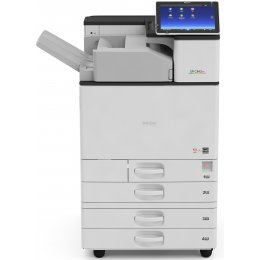


Images are for illustration purposes only and do not necessarily reflect the actual product.
Product Details
Specifications
Accessories
Reviews
Product Details
Main Features
- Single printer
- Prints upto 45 pages per minute
- Black and white and color printouts
- Resolution: 1200 x 1200 dpi
- Max Paper Capacity: 4,700 pages
- Duplex mode
- Media Type: postcards, brochures, labels
- Medis Sizes: A3, A4, A5, A6, B4, B5, B6
Specifications
General Specifications
| Technology | Laser |
| Warm-up time | 22 seconds |
| First output speed - Full colour | 5.7 seconds |
| First output speed - B/W | 4 seconds |
| Print speed - Full colour | 45 pages per minute |
| Print speed - B/W | 45 pages per minute |
| CPU - Intel Celeron-M | 1.75 GHz |
| Memory - Standard | 2 GB |
| HDD - Option | 320 GB (Encryption/Data Overwrite Security unit) |
| Duty cycle | 200000 prints per month |
| Duplex | Yes |
| Dimensions (W x D x H) | 587 x 685 x 864 mm |
| Weight | 85 kg |
| Power source | 220 - 240 V, 50/60 Hz |
| Toner capacity - Black | 43000 prints |
| Toner capacity - Cyan | 34000 prints |
| Toner capacity - Magenta | 34000 prints |
| Toner capacity - Yellow | 34000 prints |
| Toner capacity - Declared yield value | Declared yield value in accordance with ISO/IEC 19798 |
| Power consumption - Maximum | 1850 W |
| Power consumption - Ready mode | 52.1 W |
| Power consumption - Sleep mode | Less than 0.81 W |
| Power consumption - TEC (Typical Electricity Consumption) | 1.79 kWh |
| Recommended paper size - Standard paper tray(s) | SRA3, A3, A4, A5, A6, B4, B5, B6 |
| Recommended paper size - Bypass tray | A3, A4, A5, A6, B4, B5, B6, SRA3, C5, C6 |
| Paper input capacity - Maximum | 4700 sheets |
| Paper output capacity - Maximum | 3500 sheets |
| Paper weight - Paper tray(s) | 60 - 300 g/m² |
| Paper weight - Bypass tray | 52 - 300 g/m² |
| Paper weight - Duplex | 52 - 256 g/m² |
| Printer language - Standard | PCL5c, PCL5e, PCL6, PostScript 3 (emulation), PDF direct (emulation) |
| Printer language - Option | Genuine Adobe ®PostScript®3™, IPDS, PictBridge, XPS direct, PDF Direct from Adobe® |
| Print resolution | 1,200 x 1,200 dpi/2bit |
| Fonts - PCL | 93 fonts |
| Fonts - PS3 (Emulation) | TrueType: 93 fonts |
| Interface - Standard | Ethernet 10 base-T/100 base-TX/1000 base-T |
| Interface - Option | USB 2.0, Bi-directional IEEE 1284, Wireless LAN (IEEE 802.11a/b/g/n), USB Server for Second Network Interface |
| Network protocol - TCP/IP | IP v4, IP v6 |
| Network protocol | Bonjour, IPX/SPX, AppleTalk, AppleTalk (auto switching), SMB, Ipsec, IPP |
| Windows® environments | Windows® Vista, Windows® 7, Windows® 8.1, Windows® 10, Windows® Server 2008, Windows® Server 2008R2, Windows® Server 2012, Windows® Server 2012R2 |
| Mac OS environments | Macintosh OS X v10.8 or later |
| UNIX environments | UNIX Sun® Solaris, HP-UX, IBM® System i5™ HPT |
| UNIX environments - SCO OpenServer | 5.0.7, 6.0 |
| UNIX environments - RedHat® Linux | 8.x, 9.x |
| UNIX environments - RedHat® Linux Enterprise | 4, 5, 6 |
| UNIX environments - IBM® AIX | V4.3, 5L v5.1, 5L v5.2, 5L v5.3, 5L v6.1, 5L v7.1 |
| SAP® R/3® environments | SAP® R/3® |
| Authentication | Windows® authentication, LDAP authentication, Basic authentication, User code authentication, 802.1.x wired authentication, Integration server authentication |
| Network security | Disable/Enable ports and protocols, SSL support, SNMPv3 support |
 Download Manufacturer Specifications
Accessories

Reviews


Most printers have a paper-out detector. On most dot matrix printers it is a photo diode. If form-fed paper is not aligned correctly (usually on the left side) the diode won't see it.
Pages per minute (ppm) is the average print speed for black and white pages only. Actual speed may be different based on the amount of graphics on each page.
Allow ink to dry completely to avoid smudging. The time will vary based on the ink and paper quality used as well as the temperature and humidity conditions.
MY ACCOUNT
INFO & POLICIES
SHOP EASY
PAYMENT OPTIONS



* Images are for illustration purposes only.