



 Shopping Cart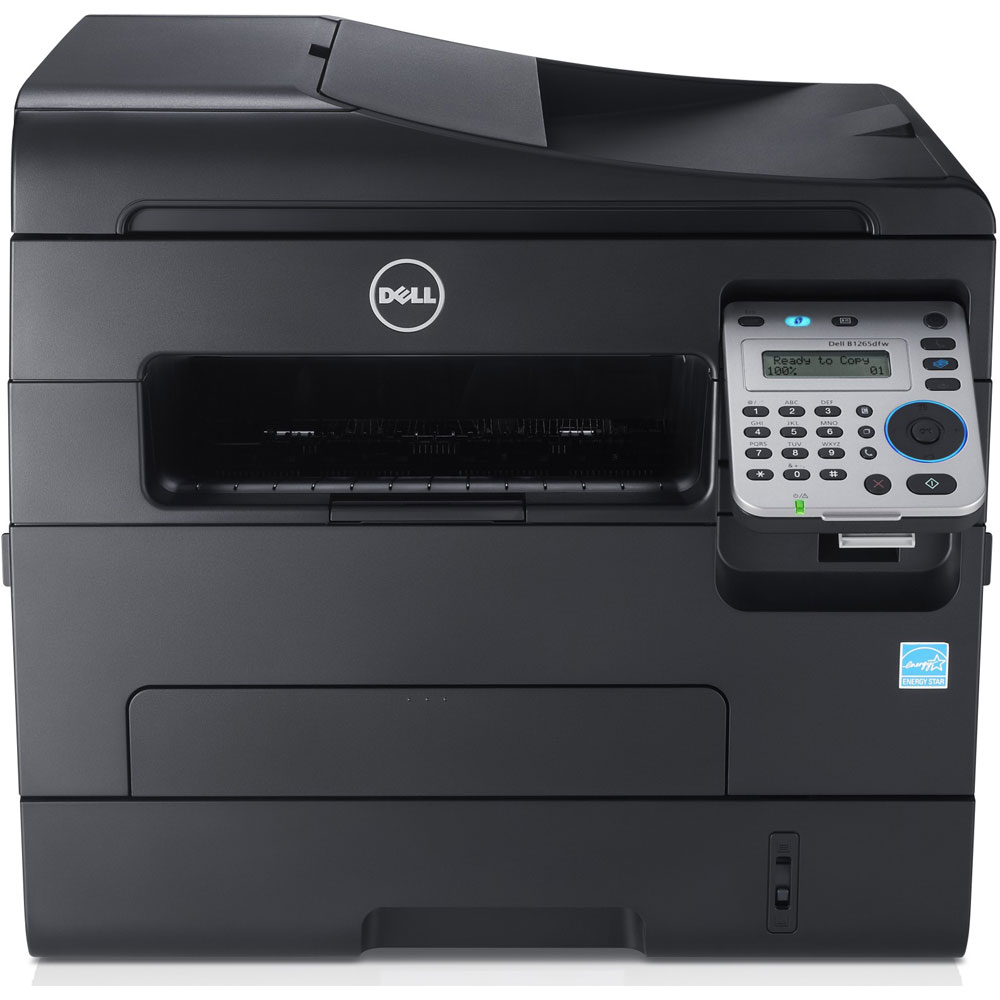



*** ALL TONERS AND SUPPLIES ARE IN STOCK AT DISCOUNTED PRICING , CALL +18882983095..
Printers do not include supplies - toners , drums (Imaging Units) (where applicable) , printer cables , manuals , consumables , trays (where applicable). Power cables are included. Drivers can be downloaded at www.hp.com. Please verify that drivers available are compatible with your software on HP’s site.
Images are for illustration purposes only and do not necessarily reflect the actual product.Product Details
Specifications
Accessories
Reviews
Product Details
Main Features
- Print, copy, scan and fax
- Black and white prints
- Duplexer for automatic two-sided printing
- Wireless Connection
- Speed: 28 ppm
- Resolution: 600dpi
- Total Media Capacity: 150 sheets
- Monthly Duty Cycle: 20,000
- Dimensions: 16.0" x 13.3" x 15.1"
Specifications
General Specifications:
Printer
-
Printer Type
Print, Scan, Copy, Fax - 4-in-1 Multifunction Black & White Laser Printer
Print speed(PPM)
Simplex, B/W @ 600 x 600 dpi, Up to 28ppm (A4)
Duplex, B/W @ 600 x 600 dpi, Up to 14ipm (A4)
Resolution
Print Resolution
600 x 600 dpi Default
1200 x 1200 dpi Max
Scan Resolution
Optical: 1200 x 1200 dpi (Color@Platen), 600 x 600 dpi (B/W@Platen), 600 x 600 dpi (Color, B/W@ADF)
Enhanced: 4800 x 4800 dpi
Default: 300 x 300 dpi
Copy Resolution
Photo (600 x 600 dpi)
Photo and Text (600 x 300 dpi)
Text (600 x 300 dpi)
Warm-up Time:(sec)
From power on to Ready state on Display:
Less than 30 secs
First Page Out:
Less than 8.5 sec (from Ready mode)
Less than 14 sec (from Sleep mode)
Printer Language Support
Printer Driver Language
SPL, PCL6, Host based XPS
Printer data stream(FW)
SPL, PCL5e, PCL 6(V2.1)
Print Management
Dell Supplies Ordering Utility
SysOID & ServiceTag OID support
Application/Utilities (Installed on Client):
DELL Printer Manager (DPM)
DELL Supplies Ordering Utility
Lite SM
Firmware Download Utility
PaperPort14 Standard
Best-in-Class (BIC) Installer
Scan Assistant
-
Media Input Sources
Standard:
250-sheet Cassette @ 80g/m2 or 10 sheets (Transparency) or 10 sheets (Label)
Maximum:
251 sheets
Media Output capacity
Standard:
150 sheets @ 80g/m2 face down, 1 sheet face up
Maximum:
151 sheets
Media Trays
Type of Tray (Multipurpose/Single Sheet Feeder/By-pass/4x6-5x7):
Standard 250 sheet Tray + Single-sheet Multipurpose tray
Mutipurpose tray- additional Media type/size declaration
1 sheets Multi-purpose Tray
Supported Media Type: Plain, Thin, Thick, Thicker, Bond, Cardstock, Cotton, Colored, Pre-Printed, Recycled, Archive, Transparency, Label, Envelope, Thick Envelope
Supported Media Weight: 16~58lb (60 to 220g/m2 )
Supported Media Size: A4, Letter, Legal, Executive, Folio, Oficio, ISO B5, JIS B5, A5, A6, Monarch, No.10, DL, C5, C6,Postcard4x6
Minimum Size (Custom): 76.2x127mm (3x5")
Maximum Size (Custom): 216x356mm (8.5x14")
Standard tray (Cassette-type)
Supported Media Type: Plain, Thin, Thick, Bond, Cardstock, Recycled, Arichve
Supported Media Weight: 16~43lb (60 to 163g/m2 )
Supported Media Size: A4, Letter, Legal, Executive, Folio, Oficio, ISO B5, JIS B5, A5, A6
Duplexer: Media Weight Range/Media List
A4, Letter, Officio, Folio, Legal
Plain Paper, Thin, Thick, Recycled
16~28lb (60 to 120g/m2)
Fax
Compression Methods: MH,MR,MMR,JBIG,JPEG(Tx Only)
Applicable line: PSTN,PABX
Fax Jobs Storage (in terms of pages): 600 pages
Optional/Expandable Memory/HDD: No
Fax Memory size: 8 MB
FAX Transmit(TX) Features: Broadcast,Delay/Schedule,Priority,Secure,Forward
FAX Receive(RX) Features: Secure
Junk/Block Fax Size list: Yes (20)
Distinctive Ring Pattern Detection (Manual/Auto): Yes
PC Fax (PC send to Device to fax out): Yes
Search LDAP support: No
Speed Dial: 200 locations
Copy Requirement
Copy modes: Mono
Copy Mode@ Resolution:
Photo, (600x600dpi)
Photo and Text, (600x300dpi)
Text (600x300dpi)
Copy speed
Single-page document: 28 copies per minute (cpm)
Multi-page document (ADF): 20 cpm (A4)
Maximum number of copies: 99
FCOT
Stand By: 14 sec (ADF), 15 sec (Platen)
Power Save : Approx. 42 sec (ADF), Approx. 42 sec (Platen)
Zoom(Platen): 25% to 400%
Zoom(ADF): 25% to 400%
Lighter/Darker increments: 11 (-5, 0, 5)
Copy features:
Cloning -YES (platen Only)
N-up -YES (2 and 4-up)
Autofit -YES
Collate -YES (ADF only)
Poster -YES (Platen only)
ID Copy -YES (Platen only)
Contrast -YES
Background removal -YES
Flatbed copy size: Max. 216 x 297 mm
Reduce / Enlarge: 25% to 400%
-
Usage Rate
Maximum Usage Rate(Duty Cycle):
20K pages per month
Average Usage Rate:
269 pages per month
Maximum Engine Life:
100K pages or 5 years (whichever comes first)
Processor
- Processor type: ARM11
Processor speed: (533MHz)
Operating System (Dell recommends Windows 10 Pro.)
- Windows
Win7(32/64bit), 2000, XP(32/64bit), Vista(32/64bit), 2003 Server(32/64bit), 2008 Server(32/64bit), 2008R2(64bit), Win8(32bit/64bit)
Mac
Mac OS 10.5~10.8
Linux
RedHat Enterprise Linux WS 4, 5, 6 (32/64 bit)
Fedora 5, 6, 7, 8, 9, 10, 11, 12, 13, 14, 15 (32/64 bit)
OpenSuSE 10.2, 10.3, 11.0, 11.1, 11.2, 11.3, 11.4 (32/64 bit)
Mandriva 2007, 2008, 2009, 2009.1, 2010 (32/64 bit)
Ubuntu 6.06, 6.10, 7.04, 7.10, 8.04, 8.10, 9.04, 9.10, 10.04, 10.10, 11.04 (32/64 bit)
SuSE Linux Enterprise Desktop 10, 11 (32/64 bit)
Debian 4.0, 5.0, 6.0 (32/64 bit)
Unix
- Sun Solaris 9,10, 11 (x86, SPARC)
- HP-UX 11.0, 11i v1, 11i v2, 11i v3 (PA-RISC, Itanium)
- IBM AIX 5.1, 5.2, 5.3, 5.4, 6.1, 7.1
Novell Netware Support
NetWare 5.x,6.x and later (TCP/IP)
SAP R/3 environment
SAP R/3 4.5B or later (device types)
Citrix Presentation Server (Metaframe) Support
CITRIX 4.5 / 5.0 / 6.0 / 6.5
Interface
Hi-Speed USB 2.0
Ethernet 10/100 Base TX
Wireless 802.11 b/g/n
Dimensions
- Shipping Dimensions (W x D x H): 496mm x 428mm x 462mm (19.5" x 16.9" x 18.2")
Shipping Weight: 13.5kg / 29.76 lb
Printer Dimensions (W x D x H): 406mm x 338mm x 384mm (16.0" x 13.3" x 15.1")
Weight (with toner): 11.1kg /24.47 lb
Weight (without toner): 10.4kg /22.93 lb
 Download Manufacturer Specifications
Accessories
*** ALL TONERS AND SUPPLIES ARE IN STOCK AT DISCOUNTED PRICING , CALL +18882983095
Reviews



Printing photos? Make sure that they are of print quality - meaning 300dpi. Anything lower than this will appear pixelated and lower than photo quality.
If you are printing on photo paper, make sure you have set the printer to this setting and have not left it on the regular printer setting.
Most printers have a built-in diagnostics program which can be very useful for troubleshooting problems and test-printing without a computer. They are usually initiated by pressing a button or two while turning on the printer.
MY ACCOUNT
INFO & POLICIES
SHOP EASY
PAYMENT OPTIONS



