



 Shopping Cart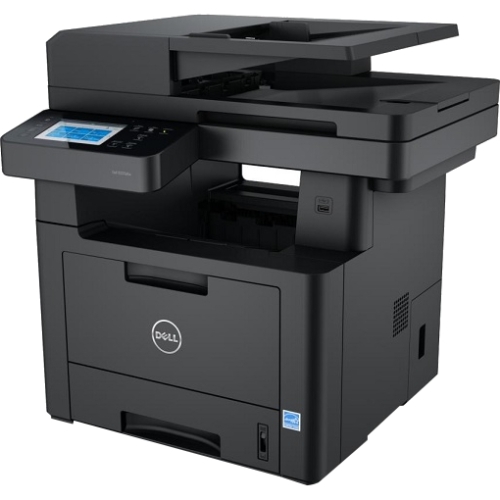

*** ALL TONERS AND SUPPLIES ARE IN STOCK AT DISCOUNTED PRICING , CALL +18882983095..
Printers do not include supplies - toners , drums (Imaging Units) (where applicable) , printer cables , manuals , consumables , trays (where applicable). Power cables are included. Drivers can be downloaded at www.hp.com. Please verify that drivers available are compatible with your software on HP’s site.
Product Details
Specifications
Accessories
Reviews
Product Details
Main Features
- Print, copy, scan and fax
- Black and white prints
- Network-ready
- Duplex printing
- Speed: 40 ppm
- Resolution: 600dpi
- Total Media Capacity: 150 sheets
- Monthly Duty Cycle: 100,000
- Dimensions: 4.33"H x 16.88"W x 13.23"D
Specifications
| Type of Printer | All-in-One |
| Wireless Ready | Wireless |
| Printer Connectivity | USB, Wireless, Network Ready |
| Photo Capable | Not Photo |
| Duplex Printing | Automatic |
| B&W PPM | 31 to 40 PPM |
| Printer Connectivity Details | WiFi 802.11 b/g/n and USB 2.0 |
| Printer Monthly Duty Cycle | Up to 100,000 pages per month |
| Scan Resolution (maximum) | 600 x 600 dpi |
| Copy Reduction/Enlargement | 25%-400% |
| Printer Memory | 1 GB |
| Printer System Requirements | Windows 8.1, 8, Server 2012, Server 2008 R2, Server 2008 R2 SP1, Server 2008 SP1 6, 7, 7 SP1, XP SP3, Server 2003 SP1, Server 2003 SP2, Vista SP1, Vista SP2: Mac: OS X 10.5 to 10.8 |
| Network Ready (Yes or No) | Yes |
| Width (in.) | 18.2 |
| Weight (lbs.) | 36.37 |
| Print Technology | Laser |
| Printer Condition | New |
| Mobile Capability | Yes |
| Number of Users | 5-10 Users |
| Output Type | Black & White |
| Supertank | Not Supertank |
| Printer Use | Small Business |
| Print Resolution (dpi) | 600 x 600 dpi |
| Printer Scanner Type | Flatbed, CIS with LED illumination |
| Copy Speed (cpm) | Up to 40/38 cpm |
| Printer Fax Speed | Up to 33.6 Kbps |
| First Page Out (seconds) | Less than or equals to 15.5 seconds |
| Mobile Printing Apps | Dell Mobile Print (Android OS), AirPrint4(iOS) Google Cloud Print |
| Printer Processor | 1 GHz |
| Height (in.) | 18.8 |
| Depth (in.) | 16.5 |
Accessories

Reviews


Your ink is not going onto the paper properly or you notice uneven coverage? Try aligning the print heads before you bring out the big guns.
Save memory on your PC by choosing the Custom option when you install your printer, and picking just the software you want to install.
Paper jam? The best way to remove jammed paper is to gently pull the paper in the direction of the paper path - with power off, of course. Do not pull the paper backwards - you could damage your printer forever by doing so.
MY ACCOUNT
INFO & POLICIES
SHOP EASY
PAYMENT OPTIONS



