



 Shopping Cart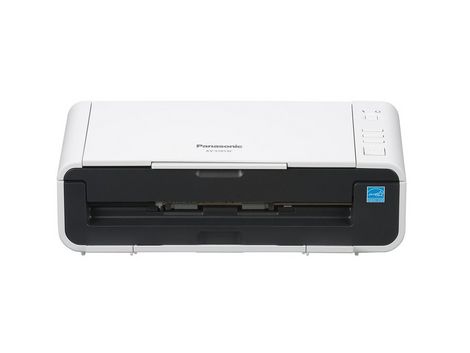



*** ALL TONERS AND SUPPLIES ARE IN STOCK AT DISCOUNTED PRICING , CALL +18882983095..
Printers do not include supplies - toners , drums (Imaging Units) (where applicable) , printer cables , manuals , consumables , trays (where applicable). Power cables are included. Drivers can be downloaded at www.hp.com. Please verify that drivers available are compatible with your software on HP’s site.
Images are for illustration purposes only and do not necessarily reflect the actual product.Product Details
Specifications
Accessories
Reviews
Product Details
Main Features
- 20 ppm / 40 ipm (200 dpi binary, Letter/Landscape)
- USB 2.0
- Scan Business Cards
- Panasonic Image Capture Plus
- Nuance Paper Port 14SE
- Windows/Mac OS Compatible
- Active Double-Feed Prevention Roller System
- cutting-edge paper feed mechanism
- Compact design
- Neat Business Class software allows you to access information via the web or soft client application.
Specifications
General Specifications
- Scanner Type: Duplex Sheet Feed Scanning
- Scanner Technology: 1-Line CIS (Contact Image Sensor
- Scanning Speed: (Letter, Portrait)Up to 20 ppm / 40 ipm (Binary 200 dpi); Up to 20 ppm / 40 ipm (Color 200 dpi)
- Resolution (Color and B/W)Resolution : 100 - 600dpi (1dpi step) Optical : 300/600dpi
- Automatic DetectionUltrasonic Double-Feed Detection
- Image CompressionJPEG (Grayscale/Color)
- Image OutputBinary, Grayscale, Color, MultiStream (Color & Binary or Gray & Binary)
- Document Size (ADF)Minimum 1.9 in. x 2.8 in. (48 mm x 70 mm) length Maximum 8.5 in. x 100 in. (216 mm x 2,540 mm) length
- "Document Weight/ThicknessSingle 11 lbs. - 55 lbs. (40 - 209 g/m2)Continuous 11 lbs. - 55 lbs. (40 - 209 g/m2) Card Up to approx. 0.03 in. (0.76 mm) in thickness + embossing
- (ISO standard 7810 ID-1 card scanning including embossed card)"
- Power RequirementAC 100 - 120 V 50/60 Hz, AC 200 - 240 V 50/60 Hz
- External Dimensions (W x D x H)11.9 in. × 7 in. × 5.4 in. (303 mm x 177 mm x 137 mm) without Feed tray
- Weight5.9 lbs. (2.7 kg)
Accessories

Reviews


Backlight correction, featured on some scanners, can automatically improve photos that were taken with a bright light behind the person.
Use the gray scale or line art option when you scan black and white images.
The optical resolution of your scanner is the most important factor in determining the level of quality your scans will have.
MY ACCOUNT
INFO & POLICIES
SHOP EASY
PAYMENT OPTIONS



