



 Shopping Cart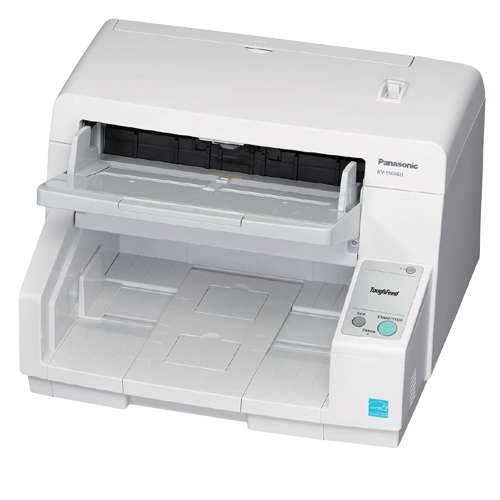

*** ALL TONERS AND SUPPLIES ARE IN STOCK AT DISCOUNTED PRICING , CALL +18882983095..
Printers do not include supplies - toners , drums (Imaging Units) (where applicable) , printer cables , manuals , consumables , trays (where applicable). Power cables are included. Drivers can be downloaded at www.hp.com. Please verify that drivers available are compatible with your software on HP’s site.
Product Details
Specifications
Accessories
Reviews
Product Details
Main Features
- Speed: 80 ppm
- Sheet Capacity: 300
- CPU Image Processing
- Includes features that save time and reduce errors
- Auto rescan
- Auto Preview
- Nine different scanning options
- Automatic error detection and correction
- Staple detection
- Commercial grade rollers
- Automatic, self cleaning features
Specifications
General Specifications
| Technical Specifications | |
| Image Sensor Type | Front side: Contact Image Sensor at 600 dpi Back side: Contact Image Sensor at 600 dpi Selectable black and white background reference |
| Light Source | LED |
| Optical Resolution | 100 600 dpi (1 dpi step), Optical: 600 dpi (Main and sub feeding directions) |
| Output Resolution | Color: 24-bit Grayscale: 8-bit Monochrome: 1-bit |
| Output Color Depth | Color: 24-bit; Grayscale: 8-bit; Monochrome: 1-bit |
| Image Processing Function | Auto preview, Auto rescan, Image emphasis, Dynamic threshold, Automatic seperation, Invert, White level from paper |
|
Performance |
|
| Scanning Speed (A4, Portrait): |
Color (24 bit) Simplex: 80 ppm, Duplex: 160 ipm (200 dpi / 300 dpi) (Landscape) |
| ADF Capacity: | 300 Sheets: 21 lbs. (80 g/m2) |
| Document Size | ADF minimum: 1.9 × 2.75 in. (48 × 70 mm) ADF maximum 6: 11.7 × 17 in. (297 × 432 mm) |
| ADF Feeding Paper Weight (Thickness) | Thickness: 1.6 - 7.9 mils (0.04 - 0.2 mm) Weight: 5 - 42 lbs. (20 - 157 g/m2) |
| Interface | USB3.0 interface (If the scanner is connected to a USB hub, it is not guaranteed to work.) |
|
Physical Specifications |
|
| Power Requirements | AC 100 120 V, 50/60 Hz |
| Power consumption (Operating) | Maximum (scanning): 90 W or less / 1.5 A (100-120 V) Minimum (ready): 30W or less Sleep Mode: 1.2 W or less Power Off:0.3 W or less |
| Dimensions (WxDxH) | 18.5 x 17.5 x 13.4 in. (468 x 444 x 339 mm) |
| Weight | 37.5 lbs. (17 kg) |
| Bundled Software | Panasonic Image Capture Plus, EMC Quick Scan Pro (Trail), Panasonic User Utility, TWAIN Driver, ISIS Driver, WIA Driver |
| OS Support | Windows® XP SP3 (32bit), Windows Vista® SP2, Windows® 7, Windows® 8 (32bit/64bit)Windows® XP SP3 (32bit), Windows Vista® SP2, Windows® 7, Windows® 8 (32bit/64bit) Windows Server® 2003 SP2, Windows Server® 2003 R2 SP2, Windows Server® 2008 SP2 (32bit/64bit) Windows Server® 2008 R2 SP1, Windows Server® 2012 (64bit) Windows Server® 2003 SP2, Windows Server® 2003 R2 SP2, Windows Server® 2008 SP2 (32bit/64bit) Windows Server® 2008 R2 SP1, Windows Server® 2012 (64bit) |
| Feed Detection Features | Double feed detection, Jam detection, Slip detection, Dog ear detection |
| Other Features | SINGLE TOUCH SCANNING, Self Cleaning Brush |
Accessories

Reviews


In order to speed up scanning, try to use a faster PC with more memory / RAM and work with as little data as possible.
The optical resolution of your scanner is the most important factor in determining the level of quality your scans will have.
Make sure the scanning glass is clean and has no dust on it before you start scanning.
MY ACCOUNT
INFO & POLICIES
SHOP EASY
PAYMENT OPTIONS



