



 Shopping Cart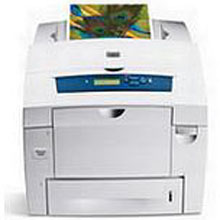



*** ALL TONERS AND SUPPLIES ARE IN STOCK AT DISCOUNTED PRICING , CALL +18882983095..
Printers do not include supplies - toners , drums (Imaging Units) (where applicable) , printer cables , manuals , consumables , trays (where applicable). Power cables are included. Drivers can be downloaded at www.hp.com. Please verify that drivers available are compatible with your software on HP’s site.
Images are for illustration purposes only and do not necessarily reflect the actual product.Product Details
Specifications
Accessories
Reviews
Product Details
Main Features
- Print Speed: 30 ppm in black and white and color
- First Page Out: 5 seconds
- Duty Cycle: 85,000 pages
- Resolution: 2400 dpi
- Built in Networking: Ethernet adapter
- Processor: 600MHZ
- Ram: 256MB (expandable to 1GB)
- Sheet Capacity: 625 sheets
- Paper Type: recycled paper, transparencies, and gloss stock
- Automatic duplexing
- Easy to access paper trays
- USB: 2.0 connectivity
- Non-toxic solid ink
Specifications
General Specifications
|
|
|
| First Page | 5 Seconds First page |
|---|---|
| Speed Color | Up to 30ppm Color Print |
| Speed Monochrome | Up to 30ppm Mono Print |
| Double Sided Printing Unit (Duplex) | Duplex as Standard |
| Printer Resolution | 2400 dpi Print |
| Double Sided Printing | Automatic Double Sided Printing |
| Product Group Output | A4 |
Interfaces |
|
| Interface Type(s) | USB & Network |
| Network Interface | 10/100 Base-TX Network |
| Network Ready | Yes |
| RJ-45 Ports | 1 x RJ-45 |
| USB Port | Yes |
| USB Ports | 1 x USB 2.0 |
System Specification |
|
| Hard Disk | Optional HDD |
| Memory (Maximum) | 256MB (1024MB Max) RAM |
| Processor | 600MHz Processor |
Compatibility |
|
| Operating Systems Supported | Windows & Mac |
Media Handling |
|
| Paper Handling Input 1 | 100 Sheet Multi-Purpose Input Tray |
| Paper Handling Input 2 | 525 Sheet Input Tray |
| Additional Paper Tray | optional 2 x 525 sheet |
| Maximum Paper Size | A4 |
| Paper Size | Tray 1: 89 x 127 mm to 216 x 356 mm Tray 2/3/4: 140 x 216 mm to 216 x 356 mm , (Max.) A4/Legal |
| Paper Trays (Standard/Maximum) | 2 (4) |
| Sheet Weight | 60 to 220g/Sq m |
| Special Media | transparencies, envelopes, labels, glossy paper, custom-size paper |
Duty Cycle |
|
| Monthly Duty Cycle | 85k Pages Per Month |
Physical |
|
| Mono or Color Printer | Color |
| Technology | Solid Ink Printer |
| Dimensions | 55.87cm (W) x 66.03cm (D) x 53.33cm (H) - Weight 34.02kg |
| Environmental | Operating Temperature 10 to 32C - Humidity 10 to 80% |
| Noise Level | 54dbA |
| Power Consumption Printing/Standby/Sleep Modes | 230W / 43W |
| Power Saving Modes | Energy Star Compliant |
| Product Summary | Xerox Phaser 8560DN A4 Color Solid Ink Printer |
| Voltage/ Power/ Frequency | 110 to 240VAC / 50 to 60Hz |
| Carton Dimensions | (W)55.88cm (H)53.34cm (L)66.04cm weight: 34.02kg |
Consumables |
|
| Color Toner Life | 3,400 Pages |
| Mono Toner Life | 6,800 Pages |
Software |
|
| Emulations | True Adobe® PostScript® 3™, PCL® 5c emulation |
| Printer Languages | PostScript |
| Drivers | Windows 2000/XP/2003 Server, Vista, Mac OS 9.x/X version 10.2 and higher, Novell NetWare 5.x/6.5 (NPDS only), UNIX/Linux (see web), Xerox Walk-Up Printer Drivers |
Accessories

Reviews


Don't move a print head unless the instructions direct it. You can damage the belt or other parts.
Tight on office space? Consider buying a machine with networking capabilities which will allow multiple users to use one printer.
Most printers have a built-in diagnostics program which can be very useful for troubleshooting problems and test-printing without a computer. They are usually initiated by pressing a button or two while turning on the printer.
MY ACCOUNT
INFO & POLICIES
SHOP EASY
PAYMENT OPTIONS



