



 Shopping Cart
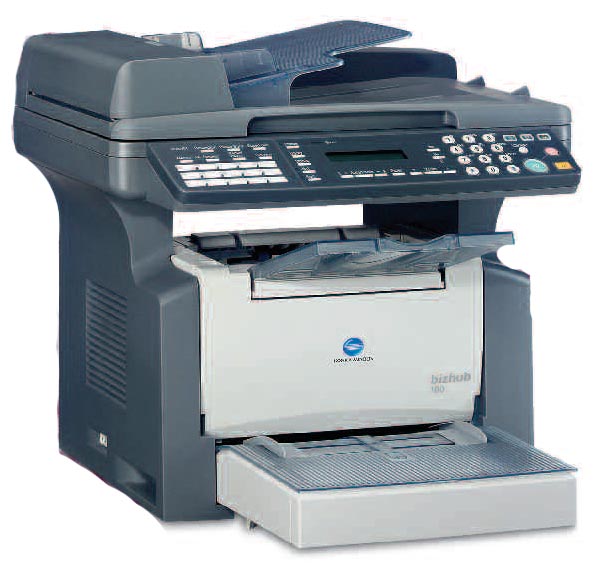
 Konica Minolta Bizhub 160 Copier Printer Scanner WITH AUTO DOC FEEDER



Product Details
Specifications
Accessories
Reviews
Product Details
Main Features
- Quality Results - As a GDI printer, the bizhub 160 delivers up to 16 pages per minute of crisp and clear text, diagrams and photographs.
- Cost-effective Functions - The bizhub 160 reduces the costs of copyingthanks in part to the 2-in-1 function that enables two originals to be copied onto a single page, lowering paper and toner consumption.
- Convenient To Use - The bizhub 160 is equipped with an easy to read and easy to use operation panel. As opposed to analogue devices, you get your first copy just a few seconds after pressing the start button with these timesaving machines. And you only need to scan an original once to produce as many copies as you need.
- Document Management Utilities - The bizhub 160 encompasses Konica Minolta’s PageScope software package: PageScope Cabinet 2.0 is a digital asset management utility that enables you to easily, quickly and efficiently store, find and manage document files.
- Special Features - The color TWAIN scanning function is ideal for capturing color images for use in PowerPoint presentations and many more.
Specifications
General Specifications
|
Standard Functions |
160/161:Digital Copier/Printer/Color Scanner | |
|---|---|---|
| 160f/161f:Digital Copier/FAX/Printer/Color Scanner | ||
| Type | Desktop | |
| Process | Laser Electrostatic | |
| Memory | Standard: 16MB | |
| Optional: 32MB | ||
| Gradation | 256 levels | |
| Type of Originals | Sheets, Books | |
| Original Size | Max. A4 (Legal) | |
| Paper Capacity | Standard: 250 sheets (Multi-purpose Tray) + 10 sheets (Bypass) | |
| Optional: 500 sheets (Second paper cassette) | ||
| Output Size | A6 to A4 (Legal) (3-1/2" x 5-1/2" to 8-1/2" x 14") | |
| Materials | Plain paper (60 - 90g/m²) | |
| Recycled paper (60 - 90g/m²) | ||
| Thick paper (91 - 163g/m²)* | ||
| OHP transparencies* | ||
| Letterheads* | ||
| Laser-quality labels* | ||
| Envelopes* | ||
| Warm-up Time | Less than 25 sec. | |
| First Copy Speed | Less than 13 sec. (Fastest 8 sec.) | |
| Copy Speed | 16 pages/min. | |
| Resolution | 600dpi x 600dpi | |
| 1-to-1 Speed | 12 pages/min. | |
| Multiple Copy | Up to 99 sheets | |
| Magnification | x0.25 - x4.0 (Adjustable in 0.01 steps) | |
| Exposure Modes | Text Mode | |
| Photo Mode | ||
| Auto Mode | ||
| Power Requirement | 220-240V, 3.8A (50/60Hz) | |
| Power Consumption | 850W or less | |
| Dimensions (W x H x D) | 160/161: 508 x 608 x 408mm (20" x 24" x 16") | |
| 160f/161f: 508 x 608 x 468mm (20" x 24" x 18-1/2") | ||
| Weight | 160/161: 14.9kg (32-3/4 lb.) | |
| 160f/161f: 17.3kg (38-1/4 lb.) | ||
*Multi-purpose Tray, Bypass
Scanner
| Type | Color Scanner | |
|---|---|---|
| Resolution | 150dpi x 150dpi, 300dpi x 300dpi, 600dpi x 600dpi | |
| Supported OS | Windows 98/Me/2000/XP | |
| Driver | TWAIN | |
| Interface | USB1.1 | |
GDI Printer Controller
| Type | Embedded | |
|---|---|---|
| Print Speed | 12 pages/min. (600dpi), 16 pages/min. (300dpi) | |
| Resolution | 600dpi x 600dpi, 300dpi x 300dpi | |
| Supported OS | Windows 98/Me, Windows NT4.0/2000/XP/2003 Server | |
| Interface | Standard: IEEE1284, USB1.1 | |
| Optional: Ethernet (100Base-TX/10Base-T) | ||
| Network Protocol* | TCP/IP, IPX/SPX | |
| Memory | Standard: 16MB (Shared with copier) | |
| Optional: 32MB (Shared with copier) | ||
| Fonts | Windows Standard Fonts | |
* Optional Network Interface Card NC-501 is required.
Accessories

Reviews


Be sure that you are printing on the 'right' side of the paper - that is - the coated side.
Paper jam? The best way to remove jammed paper is to gently pull the paper in the direction of the paper path - with power off, of course. Do not pull the paper backwards - you could damage your printer forever by doing so.
Printing photos? Make sure that they are of print quality - meaning 300dpi. Anything lower than this will appear pixelated and lower than photo quality.
MY ACCOUNT
INFO & POLICIES
SHOP EASY
PAYMENT OPTIONS



* Images are for illustration purposes only.