



 Shopping Cart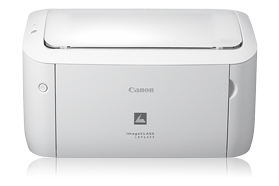

Product Details
Specifications
Accessories
Reviews
Product Details
Overview:
Single Cartridge System
To deliver high-quality prints, the LBP6000 incorporates the Canon Single Cartridge System, which combines the toner, drum and development unit in one easy-to-replace cartridge, causing excellent image quality retention and eliminating the complication and warehousing of separate toner and drum consumables.
Desktop Solution
The sleek and compact design of the LBP6000 enables it to conveniently fit on any home desk or table helping you make the most of your workspace and increase productivity.
Main Features:
- Print in black & white at up to 19 pages-per-minute (ppm)
- Quick First Print provides first print time of approximately 8 seconds
- Efficient energy saving mode; approximately 1.3W of energy used
- 150-sheet front-loading paper cassette
- Advanced Print Modes include Poster, Watermark, and Toner Saver
- Single Cartridge System for cost-efficient supplies replenishment
- Canon Generation Green
Specifications:
|
Printer |
|
|
Printing Method |
Monochrome Laser |
|
Print Speed (up to) |
Black:Up to 19 ppm (letter)1 |
|
Print Resolution (Up to) |
Black:Up to 600 x 600 dpi (2400 x 600 dpi quality) |
|
Toner Compatibility (for Laser MFP) |
Canon Cartridge 125 |
|
Buffer/Ram |
2MB (buffer memory) |
|
Paper Compatibility |
Plain Paper, Heavy Paper, Transparency, Label, Envelope |
|
Printer Features |
Print Modes |
|
Paper Handling |
150-sheet cassette2 |
|
Paper Weights |
16 to 43 lb. bond |
|
Output Tray Capacity |
100 sheets (face down)2 |
|
General |
|
|
OS Compatibility |
Windows® 7, Windows Server® 2008, Windows Vista®, Windows Server 2003, Windows XP/2000, Mac® OS X 10.4.9 & up, Linux |
|
Standard Interface |
USB Device 2.0 Hi-Speed |
|
Software Included |
Canon Drivers |
|
Power Consumption (approx.) |
Max: 850 W or less |
|
Weight |
11.1 lbs. (without cartridge); 12.2 lbs. (with cartridge) |
|
Noise |
During operation: 50 dB (sound pressure ), 6.34 B or less (sound power) |
Specifications
Accessories
*** ALL TONERS AND SUPPLIES ARE IN STOCK AT DISCOUNTED PRICING , CALL +18882983095
Reviews


If debris is the primary cause of failures, toner is the primary cause of debris. All toner cartridges release a small amount of toner powder into the machine. This is why it's important to clean the machine when you change the cartridge.
If your print settings are too dark, it could be detrimental to the life of the cartridge in the long run. It’s important that the density control of the machine be properly set to prevent the machine from pulling too much toner into itself.
Your printer is not a dumping ground. Don't pile documents or other things on top of it, as they could cause damage. Your printer could overheat and this could result in malfunctioning and even a reduction in the printer's life.
MY ACCOUNT
INFO & POLICIES
SHOP EASY
PAYMENT OPTIONS



