



 Shopping Cart
 - Supports various types of media from 4"x6" to 13"x19"
- Print amazing 4" x 6" borderless photos in approx. 37seconds
- Compact and stylish deisgn fits in any office setting
- The new Full HD Movie Print turns your favorite HD movie clips captured with your compatible Canon EOS Digital SLR or PowerShot cameras
- Create posters and business documents easily with the new Solutions Templates on the exclusive website
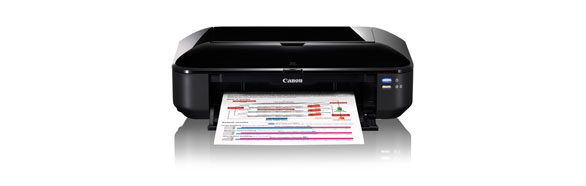
Canon Pixma IX6520 Corporate and Graphic Arts Printer

Product Details
Specifications
Accessories
Reviews
Product Details
Overview:
Extraordinary Resolution: Realize the power of 9600 x 2400 maximum color dpi firing with 1pl. This produces fantastic quality and detail in both your business documents and photos.
High Performance Individual Ink System: This 5-color ink system consists of four dye-based inks for exceptional photos plus a pigment-based black ink for crisp professional quality text. Only replace the color ink tank that runs out.
ChromaLife100+: This system combines enhanced FINE print head technology with select genuine Canon photo papers and inks for beautiful borderless photos that will last up to 300 years when stored in an archival-quality photo album.
Main Features:
Specifications:
|
Printer Type |
Inkjet Printer |
|
Features |
Auto Photo Fix II, Borderless, Document Printing, Photo Printing |
|
Print Speed (up to) |
4x6 Color Photo: Borderless Photo: Approx. 36 seconds |
|
Number of Nozzles |
Color: 4,096 |
|
Print Resolution (Up to) |
Color: 9600 x 2400 dpi |
|
OS Compatibility |
Windows®7, Windows Vista®, Windows XP |
|
Standard Interfaces |
Hi-Speed USB |
|
Ink Droplet Size |
Picoliter Size: 1,2 and 5 |
|
Paper Sizes |
4" x 6", 5" x 7", 8" x 10", Letter, Legal, 11" x 17", 13" x 19", U.S. #10 Envelopes |
|
Paper Compatibility |
Plain: Plain Paper, High Resolution Paper; |
|
Output Tray Capacity |
Auto Sheet Feeder: 150 Sheets |
|
Noise Level Approx |
45.0 dB(A) |
|
Physical Dimensions |
11.8"(L) x 21.7"(W) x 6.3"(H) |
|
Weight |
16.7 lbs. |
Specifications
 Download Manufacturer Specifications
Accessories
*** ALL TONERS AND SUPPLIES ARE IN STOCK AT DISCOUNTED PRICING , CALL +18882983095
Reviews


Using heavy or stiff paper? Feed the paper one sheet at a time or try placing a sheet of plain copier or bond paper behind a heavy sheet.
Printer not working? The printer memory could be full and not getting prints or the prints may be stuck in the print queue. Turn-off the printer, wait a few seconds and turn it back on.
Are your printer nozzles getting clogged? Try adding a humidifier to the room where you keep your printer.
MY ACCOUNT
INFO & POLICIES
SHOP EASY
PAYMENT OPTIONS



* Images are for illustration purposes only.