



 Shopping Cart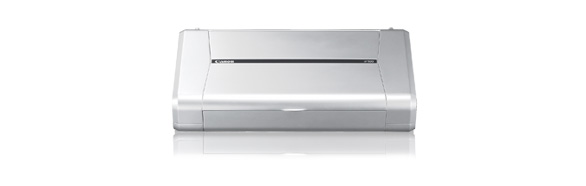

Product Details
Specifications
Accessories
Reviews
Product Details
Overview:
Today's mobile professional has more pressure than ever to be able to conduct business almost anywhere. The compact iP100 Mobile Printer delivers remarkable quality and print-anywhere portability. It affords users the ability to print beautiful borderless color photos from the car or even at the beach. Its patented print head technology and 5-color ink system let you create spectacular photos with 9600 x 2400 color dpi resolution (max.) How fast? A photo lab quality 4" x 6" borderless print takes only about 50 seconds. It offers IrDA compatibility and an optional BU-30 Bluetooth interface, so you can print wirelessly from a PC, PDA or camera phone. Or, connect a digital camera and print photos direct—no PC required! An optional Canon car adapter and rechargeable battery kit provide power on the go. Plus, the Auto Image Fix feature corrects images for the best possible exposure, color, brightness and contrast.
Main Features:
- Ease of Use
- Speed and Quality
- Connectivity and Portability
- Canon Generation Green
- Fun Print Projects
- Energy Star Qualified
Specifications:
|
Printer Type |
Photo Printer |
|
Print Speed (up to) |
4" x 6" borderless photo: approx. 50 seconds |
|
Number of Nozzles |
Black: 320 |
|
Print Resolution (Up to) |
Black:600 x 600 dpi |
|
OS Compatibility |
Windows®7, Windows Vista™, Windows XP/2000 and Mac OS® X v.10.3.9 to 10.5.x |
|
Standard Interfaces |
PictBridge (Cable not included), USB 2.0 Hi-Speed, IrDA, Bluetooth® v2.0 + EDR(optional) |
|
Paper Sizes |
Credit Card (2.13" x 3.39"), 4" x 6," 4" x 8," 5" x 7," 8" x 10," Letter, Legal, U.S. #10 Envelopes, Photo Stickers |
|
Noise Level Approx |
38.5 dB(A) in the best quality mode |
|
Physical Dimensions |
12.7"(W) x 2.4"(H) x 7.2"(D) |
|
Weight |
4.4 lbs. |
|
Power Consumption |
9W (1.5W Standby) |
Specifications
 Download Manufacturer Specifications
Accessories
*** ALL TONERS AND SUPPLIES ARE IN STOCK AT DISCOUNTED PRICING , CALL +18882983095
Reviews


Looking to save paper and ink? Make sure to only print the pages you need of your document.
After installing a printer, go to the Windows dialog box and check the settings, so you won't be surprised by what happens the first time you print.
Save memory on your PC by choosing the Custom option when you install your printer, and picking just the software you want to install.
MY ACCOUNT
INFO & POLICIES
SHOP EASY
PAYMENT OPTIONS



