



 Shopping Cart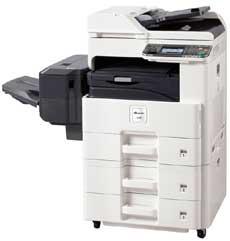

*** ALL TONERS AND SUPPLIES ARE IN STOCK AT DISCOUNTED PRICING , CALL +18882983095..
Printers do not include supplies - toners , drums (Imaging Units) (where applicable) , printer cables , manuals , consumables , trays (where applicable). Power cables are included. Drivers can be downloaded at www.hp.com. Please verify that drivers available are compatible with your software on HP’s site.
Images are for illustration purposes only and do not necessarily reflect the actual product.Product Details
Specifications
Accessories
Reviews
Product Details
INCLUDES REVERSING AUTO DOC FEEDER NETWORK PRINT /SCAN/ DRUM AND TONER. FACTORY SEALED BRAND NEW.
Product Overview:
Designed with you in mind, the CS 255 multifunctional systems with SMARTtech (Simple Management and Replacement Technology) assure simple-to-operate and simple-to-manage MFP functionality. Ideal for virtually every busy office and workgroup, especially round-the-clock document environments, highly secure offices and satellite locations. And thanks to Kyocera's SMARTtech design, when service is required interruption to your business activities is minimal, to ensure maximum uptime when you need it most. Now your business can print, copy, color scan or fax...all within your budget thanks to one of the lowest Total Cost of Ownerships' in its class.
| Functions | Network Print, Copy and Color Scan. Optional Fax/Network Fax |
| Max Monthly Duty Cycle | 40,000 |
| Resolution | 600 x 600 dpi, Fast 1200 dpi |
| Standard Paper Supply | Std 600, Max 1600 |
| Max Paper Size | 11" x 17" |
| Max Paper Weight | Drawers: 43lb Bond MPT: 140lb. Index |
| Original Size | 5.5" x 8.5" - 11" x 17" (Statement-Ledger) |
| Standard | |
| Network Connectivity | Standard: 10/100/1000Base TX; High Speed USB 2.0, USB Host (2); Optional: 10/100/1000Base TX (for Dual NIC) |
| PDL | PRESCRIBE, PCL6 (PCL XL and 5e), KPDL (PS3), XPS |
| Fax Modem Speed | 33.6Kbps |
| Fax Memory | 9.5MB Std |
Specifications
Accessories

Reviews


Copiers are an important investment for your business. Take the time to ask advice from a copier expert.
CMYK – This stands for Cyan-Magenta-Yellow-Black which are the four colors of toner that can be used in a copier.
Look at the cost of consumables for your copier before you buy - this will give you an idea of how much it will cost you to run your copier in the future.
MY ACCOUNT
INFO & POLICIES
SHOP EASY
PAYMENT OPTIONS



