



 Shopping Cart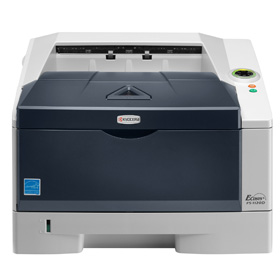

*** ALL TONERS AND SUPPLIES ARE IN STOCK AT DISCOUNTED PRICING , CALL +18882983095..
Printers do not include supplies - toners , drums (Imaging Units) (where applicable) , printer cables , manuals , consumables , trays (where applicable). Power cables are included. Drivers can be downloaded at www.hp.com. Please verify that drivers available are compatible with your software on HP’s site.
Product Details
Specifications
Accessories
Reviews
Product Details
Product Overview:
Get the job done professionally and economically with the Kyocera FS-1120D - the printer that suits the needs of small offices and businesses. This compact, yet fast desktop monochrome laser printer provides users with up to 30 pages per minute (A4), paper saving duplex printing, and connects easily to any PC with a standard USB interface. The FS 1120D is a robust and reliable printer with Kyocera’s proven ECOSYS long-life technology, with a cartridge-free design and durable components, making this printer an economical sound investment.
|
Title: |
ECOSYS FS-1120D |
|
Output Speed: |
Up to 30 A4 pages per minute |
|
Processor: |
PowerPC 405F / 360MHz |
|
Resolution: |
Fast 1200 dpi |
|
Memory: |
Standard: 32MB RAM |
|
Time To Print First Page: |
6 seconds or less |
|
Warm Up Time: |
19 seconds or less from power on |
|
Paper Handling Input: |
250 sheet paper cassette + 50 sheet multipurpose tray |
|
Maximum Paper Handling Input: |
550 sheets (with optional PF-100) |
|
Paper Handling Output: |
250 sheets face down |
|
Duplex: |
Automatic (built-in) |
|
Emulation: |
PCL6, PCL5c, PostScript*3 (KPDL3), with automatic emulation sensing, Line Printer, IBM Proprinter X24E, Epson LQ-850, Diablo 630 |
|
Standard Interface: |
USB 2.0 (Hi-Speed) Optional: Fast Ethernet (10/100 Base-TX) |
|
Drum Life: |
100,000 pages |
|
Dimensions & Weight: |
375mm x 393mm x 250mm (W x D x H) - approx 12 kg |
Specifications
 Download Manufacturer Specifications
Accessories

Reviews


Copiers are an important investment for your business. Take the time to ask advice from a copier expert.
The best way to store paper for copying is in its wrapper. This will prevent it absorbing moisture from the air which would make it damp.
Store the paper in the same room as the copier so that the paper is the same temperature as the copy machine.
MY ACCOUNT
INFO & POLICIES
SHOP EASY
PAYMENT OPTIONS



