



 Shopping Cart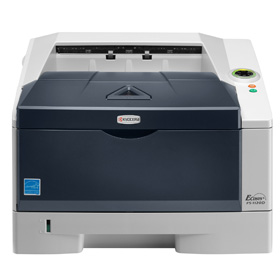

Product Details
Specifications
Accessories
Reviews
Product Details
Product Overview:
Get the job done professionally and economically with the Kyocera FS-1120D - the printer that suits the needs of small offices and businesses. This compact, yet fast desktop monochrome laser printer provides users with up to 30 pages per minute (A4), paper saving duplex printing, and connects easily to any PC with a standard USB interface. The FS 1120D is a robust and reliable printer with Kyocera’s proven ECOSYS long-life technology, with a cartridge-free design and durable components, making this printer an economical sound investment.
|
Title: |
ECOSYS FS-1120D |
|
Output Speed: |
Up to 30 A4 pages per minute |
|
Processor: |
PowerPC 405F / 360MHz |
|
Resolution: |
Fast 1200 dpi |
|
Memory: |
Standard: 32MB RAM |
|
Time To Print First Page: |
6 seconds or less |
|
Warm Up Time: |
19 seconds or less from power on |
|
Paper Handling Input: |
250 sheet paper cassette + 50 sheet multipurpose tray |
|
Maximum Paper Handling Input: |
550 sheets (with optional PF-100) |
|
Paper Handling Output: |
250 sheets face down |
|
Duplex: |
Automatic (built-in) |
|
Emulation: |
PCL6, PCL5c, PostScript*3 (KPDL3), with automatic emulation sensing, Line Printer, IBM Proprinter X24E, Epson LQ-850, Diablo 630 |
|
Standard Interface: |
USB 2.0 (Hi-Speed) Optional: Fast Ethernet (10/100 Base-TX) |
|
Drum Life: |
100,000 pages |
|
Dimensions & Weight: |
375mm x 393mm x 250mm (W x D x H) - approx 12 kg |
Specifications
 Download Manufacturer Specifications
Accessories

Reviews


Paper left in the feed tray of the copier for a long time can dry and curl causing jams.
Copiers can take up a large amount of office space. Make sure you measure the room you intend to use the copier in and check it will fit properly.
Will you be making lots of copies? Consider looking out for a large capacity paper tray which should be able to hold approximately 1000 sheets of paper.
MY ACCOUNT
INFO & POLICIES
SHOP EASY
PAYMENT OPTIONS



