



 Shopping Cart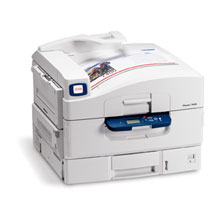

*** ALL TONERS AND SUPPLIES ARE IN STOCK AT DISCOUNTED PRICING , CALL +18882983095..
Printers do not include supplies - toners , drums (Imaging Units) (where applicable) , printer cables , manuals , consumables , trays (where applicable). Power cables are included. Drivers can be downloaded at www.hp.com. Please verify that drivers available are compatible with your software on HP’s site.
Product Details
Specifications
Accessories
Reviews
Product Details
Overview
One printer, no waiting.
It’s one of the fastest in its class, so the Phaser 7400 printer tackles your team’s everyday printing workload at record speed. It has advanced printing features to guarantee fast throughput and no bottlenecks, even in the busiest workgroup traffic.
- With print speeds of 36 ppm for color and 40 ppm for black-and-white, and a first page out time as fast as 12 seconds (color), the Phaser 7400 cranks out the print jobs almost as fast as you can send them.
- A fast 800 MHz processor, memory options that scale from 256MB up to a full gigabyte of RAM, and job pipelining mean that jobs won’t get stuck in long queues.
- True Adobe® PostScript® 3™ and built-in intelligent features like automatic tray selection ensure the job is done right the first time to avoid reprints and delays.
- Installation is fast and easy with Xerox Installer Tools, while advanced drivers make choosing the right print settings a snap.
Great power at a great value.
While its capabilities are robust, the Phaser 7400 printer is priced to be accessible for offices of all sizes. Its basic features provide the quality and speed you expect. And you can select the right additional options for your business at a price that fits your budget.
- Economical pricing and a variety of configurations and options make the Phaser 7400 an affordable solution for workgroups with print jobs of all sizes.
- Get the same low cost per page you’re used to for black-and-white prints, andadd the impact of color for only pennies more.
- Plenty of office-smart features are built in: PrintingScout alert tool will monitor print jobs and provide pop-up help, and Support Centre Utility provides easy access to detailed support information. Job accounting and usage detail tracking capabilities, as well as detailed information on consumable usage are easily accessible.
- High volume print jobs as well as small specialty projects can be run on-demand, in-house, saving substantial time and money.
- Add a hard drive (standard on most configurations) and get more productivity tools, including Secure Print to keep private documents private, and Personal Print to separate users’ jobs and store them on the printer for easy future access right from the front panel.
Main Features
- Print Speed: 40 ppm Black, 36 ppm Color
- Resolution: 600 x 1200 dpi
First page out in 12 seconds - Paper Handling: 800 Sheet Input Capacity Consists of:
1 x 250 Sheet Multipurpose Tray
1 x 550 Sheet Standard Tray
- Features: Wide Format (Up to 12" x 18")
- Memory: 256 MB (1 GB Max.)
- Connectivity: USB and 10/100 Base-TX Ethernet
- Environments: PC and Mac Compatible
All our reconditioned printers are clean, tested and working.
Specifications
Accessories

Reviews


Set your printer to maximum dpi setting to obtain the best image quality.
After installing a printer, go to the Windows dialog box and check the settings, so you won't be surprised by what happens the first time you print.
When power is applied, you should hear the print mechanism initialize and most printers have at least one light which will be illuminated when it is on.
MY ACCOUNT
INFO & POLICIES
SHOP EASY
PAYMENT OPTIONS



