



 Shopping Cart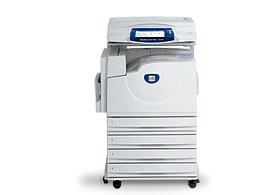

*** ALL TONERS AND SUPPLIES ARE IN STOCK AT DISCOUNTED PRICING , CALL +18882983095..
Printers do not include supplies - toners , drums (Imaging Units) (where applicable) , printer cables , manuals , consumables , trays (where applicable). Power cables are included. Drivers can be downloaded at www.hp.com. Please verify that drivers available are compatible with your software on HP’s site.
Product Details
Specifications
Accessories
Reviews
Product Details
Main Features
- Fastest warm-up time in its class so it's ready when you are
- Faster to first-page-out than most competitive products
- Easier to use than competitive products due to its large touch screen interface and smart management tools
- Better quality documents with higher print resolution and better color technologies than competitive products
- Emulsion Aggregate High Grade (EA HG) Toner is grown utilizing a patented process, resulting in faster warm-up times, better image quality, and a uniform finish
- Xerox scan capture and distribution software option is easy to use, install, and has valuable features that competitive products don't have
- Less downtime with SMart Kit™ components that users can easily replace themselves. Competitive products require calls for service to do this, which lowers productivity
- Two controllers can coexist in one device (with EFI Fiery print controller option), unlike competitors that can’t have two controllers on one MFP, so you’ll have a choice for EFI workflow or if you need additional color management
- Easier and faster development of custom user interface software than most competitors because the Xerox Extensible Interface Platform is based on web standards
Features that Enhance Productivity
- Fast print and copy output in color at up to 40 ppm and 45 ppm in black-and-white means the WorkCentre 7300 series can keep up with your heavy workload all day long
- Large color touch screen interface provides easy access to all advanced features so you get your job done fast
- Xerox Extensible Interface Platform™ (EIP) allows document-related software applications to be accessed on the user interface to improve workflow and minimize time at the device
- No waiting at the device because users can simultaneously print, fax, and scan or copy
- Finish documents in-house with hole punching, stapling, and booklet making so they're ready for immediate distribution
- Fast scan speed through the document feeder of up to 50 ppm in black-and-white and 45 ppm in color for quickly converting paper documents to digital files
- Fast warm-up time of 30 seconds from power saver mode and 45 seconds from power off (70 seconds for power off on WorkCentre 7346 model)
- Program, monitor and manage workflows with the Command WorkStation included in the optional EFI Fiery System 8e Network Controller
- Wide array of fax tools and features such as faxing from your desktop and Fax Forward, which allows for digital storage and distribution of fax documents
- Preview images on the user interface before sending or printing them with optional Thumbnail Preview feature
- Scan to Home feature simplifies scanning by allowing you to scan directly to your pre-defined home destination
- Convert paper to digital files and easily email them around the office or around the world with Xerox scan capture and distribution software (optional)
- Edit and manipulate scanned documents at your desktop with Xerox software, which includes Nuance PaperPort® and OmniPage® software (optional)
- Maximize uptime with SMart Kit™ components that tell you in advance when to replace them
- See jobs in the queue at the user interface with the ability to promote, delete and hold jobs
- Send and receive faxes simultaneously with the three-line fax option
- Easy device management including access to job status and accounting data right from your desktop
Features that Provide the Color You Need
- 1200 x 1200 dpi print resolution produces great image quality so you will get the results you expect from your documents
- Emulsion Aggregation (EA) High Grade Toner is grown utilizing a patented process, resulting in better image quality and increased toner yield
- Achieve greater cost control of all printing, copying, faxing and scanning jobs with Xerox Standard Accounting
- EFI Fiery System 8e Network Controller provides color management tools for your color applications
- Limit color access to specific users or groups via password or PIN
- Easy ID card-swipe solution with Xerox Secure Access Unified ID System™ provides quick access to functions that need to be secured or tracked within your current security infrastructure
- Encrypted hard drive secures all copy, print, fax, or email jobs stored on it
- Safe email and fax transmissions with encryption and password- protected PDFs
- Follow-You™ Printing feature lets users submit jobs to a secure print queue for printing on any available networked device after user authentication
Professional installation available - please call for pricing
Specifications
Accessories

Reviews



Copiers can take up a large amount of office space. Make sure you measure the room you intend to use the copier in and check it will fit properly.
Is your copy image too light? Manually adjust the copy density to a darker setting.
Do not mix two types of paper in one tray of the copier.
MY ACCOUNT
INFO & POLICIES
SHOP EASY
PAYMENT OPTIONS



