



 Shopping Cart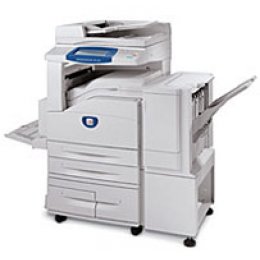

*** ALL TONERS AND SUPPLIES ARE IN STOCK AT DISCOUNTED PRICING , CALL +18882983095..
Printers do not include supplies - toners , drums (Imaging Units) (where applicable) , printer cables , manuals , consumables , trays (where applicable). Power cables are included. Drivers can be downloaded at www.hp.com. Please verify that drivers available are compatible with your software on HP’s site.
Product Details
Specifications
Accessories
Reviews
Product Details
Main Features
-
An amazing array of scanning functionality like scan to email, scan to mailbox, scan to PC, scan to file server and scan to FTP or SMB, giving you the ability to electronically file, archive or distribute documents.
-
Breakthrough Emulsion Aggregate (EA) Toner delivers sharper, more uniform image quality, longer fuser life and less waste.
-
Best-in-class media handling (16 lb. - 110 lb. stock) and smart paper trays that sense paper size and automatically match the requirements of the input.
-
Virtually unlimited scan and program ahead while the device is busy printing. This true multi-tasking means you never have to wait!
-
Scan to email, both single-sided and two-sided documents with ease. Select or search email addresses or groups from an address book or type it in.
Print to mailbox to save and store jobs, then print and copy them from the device when you need them. -
Secure print, secure fax, encrypted data transmission and disk image overwrite protection gives you peace of mind.
-
Powerful fax features include high-speed modem, JBIG compression, speed dials and group dials. Fax 2-sided documents automatically and also print incoming faxes 2-sided.
-
A short paper path makes paper handling extremely reliable- even for heavy or specialty papers.
-
Job Queue shows all jobs queued in the system and allows easy job prioritization.
-
Supplies are easy for anyone to replace, which keeps the machine running without the need for a service call.
Loaded with features found only in high-end devices like annotation, build job and transparency separators plus sets. -
A wide array of tools to remotely view status, manage and administer the device.
-
Finisher option has ability for single and dual stapling with multiple position selections.
-
A large, easy to use touch screen graphical interface and integrated control panel provides convenient access to all advanced features.
Features that Reduce Cost
-
EA toner: that results in a longer fuser life and less waste giving you better reliability and a lower total cost-of-ownership over the life of the machine.
-
Internet fax: eliminates toll calls and you don't have to worry about getting a busy signal.
-
Scanning features: allows you to distribute documents quickly to virtually anywhere in the world and save on your mailing costs.
-
Automatic 2-sided copying: saves on paper costs and is environmentally friendly.
-
Negative image: feature for black-and-white images with a lot of background saves toner consumption.
-
High-speed fax: at 33 Kbps reduces call duration so you save on your phone bills.
-
Multiple-up: prints multiple pages on a single sheet, saving paper.
-
Delayed send fax: allows you to fax at a later time when the rates may be lower.
-
Energy Star Compliant: which means you save on energy costs.
-
JBIG Compression: for faxes provides 20-80% efficiency in compression making the transmissions much faster.
Features that Save Time
-
Fast page out: time of less than 6 seconds, reduces wait time at the copier. Most documents are fewer than 5 pages so how fast the first page is delivered is a key indicator of copier performance.
-
Stored programming: allows you to store commonly used jobs in memory, so you recall the job quickly, load the originals and press start.
-
Consumable supplies: are long lasting and designed to be easily replaced by anyone and without a service call.
-
Scan speeds: of up to 50 pages per minute, so you can walk away with your documents much sooner.
-
Interrupt: to allow the local user the ability to quickly run a copy job, despite the presence of other jobs in the system.
-
Print reports: to quickly get information like billing meters, fax mode settings and system data.
-
Transparency separators: enables you to place dividers between pages, and to make hard copy sets to handout, all in one easy operation.
Features that Enhance Productivity
-
Build job: to divide a job into numerous segments and apply unique programming to each individual segment.Annotation: enables you to add text like page number, date or a predetermined phrase to the copy output.
-
Watermarks: provide the ability to print text, such as "Draft" or "Confidential," in the background of every page of a document.
-
Covers: allow you to feed the front or back cover page of the document from a different media tray, with or without imaging and also one-sided or two-sided imaging.
-
Mixed-sized originals: allows you to scan originals of different sizes in one job to produce either mixed size or common sized output.
-
Auto Reduce/Enlarge: proportionally reduces or enlarges the image on the copies based on the size of the original and the size of the selected output paper.
-
Auto Tray Selection: where the machine chooses the correct paper for the copy job based on the size of the originals being scanned.
-
Auto 2-sided printing: allows you to print on both sides of the paper without reloading sheets.
-
Poster: to enlarge an original document onto multiple sheets of paper that can be pasted together to make a large poster.
-
Booklet Creation: reduces the size of each page by 50% and prints two pages per sheet. It prints the pages in the correct order so the document can be folded and stapled to form a booklet.
-
Multiple-up: enables printing of more than one page on a single sheet. One-up, two-up or as many as eight-up printing on the same page. This environmentally friendly feature decreases the consumption of paper and ink.
Professional installation available - please call for pricing
Specifications
Accessories

Reviews


Do not store paper you are planning to use in a copier or printer in direct sunlight as this will cause it to dry out and fade.
Remember to choose double-sided when copying multiple pages in order to save paper.
Make sure to include a stapling option if you need stapled copies.
MY ACCOUNT
INFO & POLICIES
SHOP EASY
PAYMENT OPTIONS



