



 Shopping Cart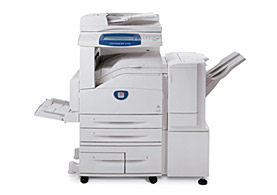

*** ALL TONERS AND SUPPLIES ARE IN STOCK AT DISCOUNTED PRICING , CALL +18882983095..
Printers do not include supplies - toners , drums (Imaging Units) (where applicable) , printer cables , manuals , consumables , trays (where applicable). Power cables are included. Drivers can be downloaded at www.hp.com. Please verify that drivers available are compatible with your software on HP’s site.
Product Details
Specifications
Accessories
Reviews
Product Details
Main Features
- Copy with optional fax.
- up to 23 / 28 ppm
- Up to a maximum of 3,100 sheets and 5 paper trays including the bypass tray.
- Feed up to 110 lb. media from most trays.
- First page out time is less than 4.5 seconds.
- Finisher with single and dual stapling available.
- 50-sheet Duplex Automatic Document Feeder (1-1, 1-2, 2-1, 2-2).
- Can be upgraded to add print, fax, scan, e-mail and other network options.
- Scan-once-print-many technology.
- High-speed fax modem and JBIG compression.
- Maximum duty cycle up to 100,000 pages per month.
Professional installation available - please call for pricing
Specifications
Accessories

Reviews


Use the zoom feature to enlarge or reduce copies for when you need part of a document or want to change the size of the document.
If you need your copier to process multiple tasks simultaneously, you may need to purchase additional memory.
Is your copy image too light? Manually adjust the copy density to a darker setting.
MY ACCOUNT
INFO & POLICIES
SHOP EASY
PAYMENT OPTIONS



