



 Shopping Cart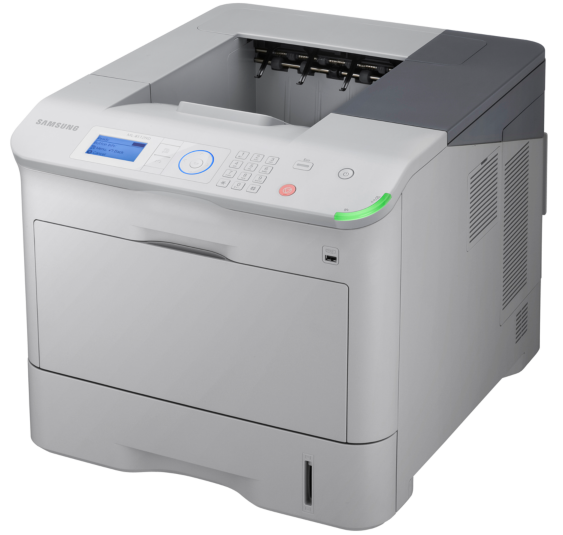



*** ALL TONERS AND SUPPLIES ARE IN STOCK AT DISCOUNTED PRICING , CALL +18882983095..
Printers do not include supplies - toners , drums (Imaging Units) (where applicable) , printer cables , manuals , consumables , trays (where applicable). Power cables are included. Drivers can be downloaded at www.hp.com. Please verify that drivers available are compatible with your software on HP’s site.
Product Details
Specifications
Accessories
Reviews
Product Details
Main Features
Fast and Powerful
Time is money. So the Samsung supplied the ML-6512ND with a 700MHz dual-core processor and up to 1GB LAN support. You’ll experience fast large-document print times, as well as performance usually associated with enterprise-level printers. Print speeds are a fast 65 ppm and First Page Out Time (FPOT) is less than 8 seconds.
Efficient Paper Handling
The ML-6512ND printer can handle your biggest jobs. It comes standard with a 520-sheet cassette and 100-sheet multi-purpose tray, and you have the option of adding on either four or more cassettes for a total input capacity of 2,700, or add two additional cassettes with a 2,000-sheet high-capacity feeder, for a total input capacity of 3,660 sheets.
Secure Printing
Worried that you won’t make it to the printer before your confidential job starts printing? Prefer to send several confidential documents at once, instead of having to go get them at the printer one at a time? Samsung’s Secure Job Release function makes printing sensitive documents easy. Simply send the job to the printer, then authorize it to print only when you enter your code on the printer itself.
Specifications
General Specifications
| Interfaces/Ports | |
|---|---|
| USB | Yes |
|
Display & Graphics | |
| Display Screen Type | LCD |
|
General Information | |
| Manufacturer | Samsung |
| UPC Code | 635753628500 |
| Manufacturer Part Number | ML-6512ND |
| Brand Name | Samsung |
| Marketing Information |
The ML-6512ND printer can handle your biggest jobs. It comes standard with a 520-sheet cassette and 100-sheet multi-purpose tray, and you have the option of adding on either four or more cassettes for a total input capacity of 2,700, or add two additional cassettes with a 2,000-sheet high-capacity feeder, for a total input capacity of 3,660 sheets. |
| Product Model | ML-6512ND |
| Manufacturer Website Address | http://www.samsungusa.com |
| Product Series | ML |
|
Memory | |
| Standard Memory | 256 MB |
| Maximum Memory | 768 MB |
|
Network & Communication | |
| Ethernet Technology | Gigabit Ethernet |
| Ethernet | Yes |
|
Physical Characteristics | |
| Height | 18.3" |
| Width | 21.3" |
| Depth | 16.5" |
| Weight (Approximate) | 1227.52 oz |
| Form Factor | Desktop |
|
Media Handling | |
| Media Size | Legal - 8.50" x 14.02", Monarch Envelope, C5 Envelope - 6.38" x 9.02", C6 Envelope - 4.49" x 6.38", DL Envelope - 4.33" x 8.66", Envelope No. 10, Envelope No. 9, Custom Size |
| Standard Input Media Capacity | 620 sheets |
| Number of Input Trays Supported | 5 |
| Number of Input/Multipurpose Trays Installed | 2 |
| Media Handling | 1 x Multipurpose Tray 100 Sheet, 1 x Output Bin 500 Sheet, 1 x Cassette 520 Sheet |
| Media Type | Plain Paper, Thin Paper, Thick Paper, Bond Paper, Color Paper, Card Stock, Label, Transparency, Envelope, Preprinted Paper, Recycled Paper, Archive Paper |
| Maximum Input Media Capacity | 3660 sheets |
| Maximum Print Size | Legal - 8.50" x 14.02" |
|
Processor & Chipset | |
| Processor Speed | 700 MHz |
|
Power Description | |
| Standby Power Consumption | 10 W |
| Operating Power Consumption | 900 W |
|
Technical Information | |
| Platform Supported | SPARC, Mac, PC |
| Maximum Print Resolution | 1200 x 1200 dpi |
| Number of Colors | 1 |
| Maximum Mono Print Speed (ppm) | 65 |
| USB Direct Printing | Yes |
| Print Color | Monochrome |
| Duplex Printing | Automatic |
|
Reliability | |
| Duty Cycle | 300000 pages per month |
|
Fonts & Emulation | |
| Language Emulation | PCL 5e, PCL 6, IBM ProPrinter, PostScript 3, PDF v1.7, XPS |
Accessories

Reviews



Be sure that you are printing on the 'right' side of the paper - that is - the coated side.
Don't move a print head unless the instructions direct it. You can damage the belt or other parts.
Misplaced your printer manual? You can usually find a replacement manual online at the manufacturer's website.
MY ACCOUNT
INFO & POLICIES
SHOP EASY
PAYMENT OPTIONS



