



 Shopping Cart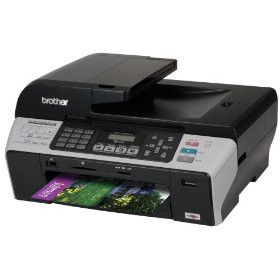

*** ALL TONERS AND SUPPLIES ARE IN STOCK AT DISCOUNTED PRICING , CALL +18882983095..
Printers do not include supplies - toners , drums (Imaging Units) (where applicable) , printer cables , manuals , consumables , trays (where applicable). Power cables are included. Drivers can be downloaded at www.hp.com. Please verify that drivers available are compatible with your software on HP’s site.
Product Details
Specifications
Accessories
Reviews
Product Details
Product Overview:
The Professional Series MFC-5490cn all-in-one is perfect for your everyday business applications - presentations, spreadsheets, reports and more. Save time with unattended fax, copy and scan using the large 50-sheet capacity auto document feeder and high volume paper handling with up to 150-sheets.
Main Features:
- Built-in Wired Ethernet Network Interface. Allows you to share the MFC through your network now or in the future. Just plug it into your wired or wireless router and share it to print, scan, PC-Fax and access your digital camera media cards or USB flash memory drive.
- Unattended Fax, Copy or Scan. Up to 50-sheet auto document feeder.
- Fast Color Printing on Demand. With speeds up to 35ppm black and 28ppm color.
- Send and Receive Faxes. Hi-Speed Super G3 33.6K bps fax modem allows black and white or color faxing with or without a PC.
- Direct Photo Printing on Demand. Print photos directly from your digital camera's media card slots, PictBridge-enabled camera, or USB flash memory drive.
- Large Paper Capacity. Standard paper tray can hold up to 150-sheets of paper from 3.5" x 5" to 8.5" x 14".
- 4-Cartridge Ink System. Only change the cartridge that needs to be replaced.
- Professional Printing Quality. With droplet sizes as small as 1.5 picoliters and high resolutions up to 6000 x 1200dpi.
- Energy Star Qualified.
Specifications
Accessories
*** ALL TONERS AND SUPPLIES ARE IN STOCK AT DISCOUNTED PRICING , CALL +18882983095
Reviews


Most printers have a paper-out detector. On most dot matrix printers it is a photo diode. If form-fed paper is not aligned correctly (usually on the left side) the diode won't see it.
Set your printer for the proper paper type and weight. Fine art papers are heavier than ordinary inkjet or bond papers so set the printer to thicker paper settings.
Misplaced your printer manual? You can usually find a replacement manual online at the manufacturer's website.
MY ACCOUNT
INFO & POLICIES
SHOP EASY
PAYMENT OPTIONS



