



 Shopping Cart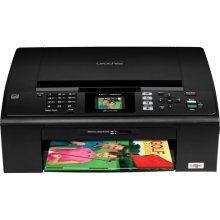

*** ALL TONERS AND SUPPLIES ARE IN STOCK AT DISCOUNTED PRICING , CALL +18882983095..
Printers do not include supplies - toners , drums (Imaging Units) (where applicable) , printer cables , manuals , consumables , trays (where applicable). Power cables are included. Drivers can be downloaded at www.hp.com. Please verify that drivers available are compatible with your software on HP’s site.
Product Details
Specifications
Accessories
Reviews
Product Details
Product Overview
The Brother MFC-J265W is a compact All-in-One that is perfect for the small or home office user. The wireless (802.11b/g) network interface on the MFC J265W allows sharing with multiple computers on a network. The Brother J265W also features a built-in fax which enables you to send and receive documents without using your computer. The 1.9" color LCD display on the control panel is ideal for viewing images and easy menu navigation.
Main Features
- Built-in Wireless Network Capabilities. Convenient wireless (802.11b/g) network interface.
- Convenient Built-in Fax. No PC required to send and receive documents via stand-alone fax.
- 1.9" Color LCD Display. For viewing images and easy menu navigation.
- Fast Color Printing. With speeds up to 33ppm black and 27ppm color.
- Direct Photo Printing on Demand. Print photos on demand directly from your memory cards.
- Versatile Scanning Capabilities. Can scan directly to E-mail, File, OCR and more, using a variety of formats including JPEG, TIFF and PDF.
- Professional Printing Resolutions. Print borderless photos with droplet sizes as small as 1.5 picoliters and high resolutions up to 6000 x 1200dpi.
- Flatbed Copying and Scanning. Flatbed copier allows you to copy bound, thick or odd shaped documents.
- iPrint&Scan. Free app download for wireless printing (JPEG images) from and scanning to your Apple iPhone, iPad or iPod touch.
- 4-Cartridge Ink System. Only change the cartridge that needs to be replaced.
- ENERGY STAR Qualified.
Specifications
Accessories
*** ALL TONERS AND SUPPLIES ARE IN STOCK AT DISCOUNTED PRICING , CALL +18882983095
Reviews



Set your printer for the proper paper type and weight. Fine art papers are heavier than ordinary inkjet or bond papers so set the printer to thicker paper settings.
Flashing light on your printer? Each printer has a different reason for a blinking or orange light but in general it is due to a paper jam, an empty paper tray, a printer cartridge problem or a problem with the printer hardware.
What is dpi? Dpi is used to describe the resolution number of dots per inch in a digital print. The higher the numbers, the more detailed the print image is.
MY ACCOUNT
INFO & POLICIES
SHOP EASY
PAYMENT OPTIONS



