



 Shopping Cart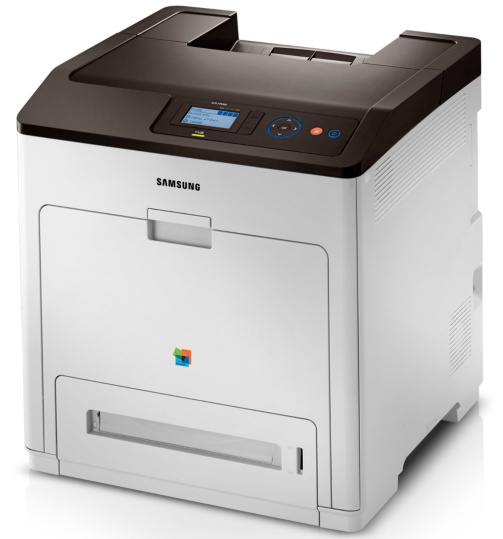



*** ALL TONERS AND SUPPLIES ARE IN STOCK AT DISCOUNTED PRICING , CALL +18882983095..
Printers do not include supplies - toners , drums (Imaging Units) (where applicable) , printer cables , manuals , consumables , trays (where applicable). Power cables are included. Drivers can be downloaded at www.hp.com. Please verify that drivers available are compatible with your software on HP’s site.
Images are for illustration purposes only and do not necessarily reflect the actual product.Product Details
Specifications
Accessories
Reviews
Product Details
Overview:
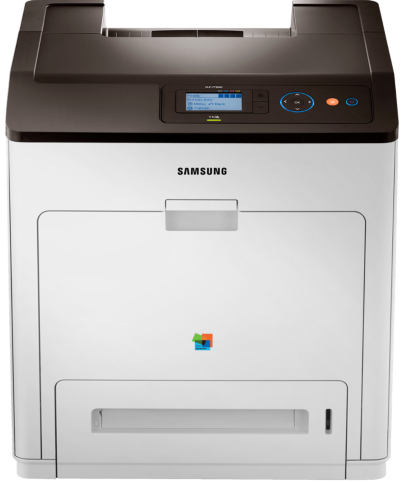
The Samsung CLP 775ND is the performance your workplace needs, at an affordable price. The Samsung CLP775-ND is a professional-grade color laser printer that maximizes the quality of your printout and minimizes operational costs. From one job to the next, you’ll see why the CLP 775-ND is the ultimate office assistant— working tirelessly to deliver vivid, quality color printouts in a snap.
Specifications
General Specifications
|
Function |
Color Print |
|
Speed (Mono) |
Up to 33ppm in A4 (35ppm in Letter) |
|
Speed (Color) |
Up to 33ppm in A4 (35ppm in Letter) |
|
First Print Out Time (Mono) |
Less than 10 sec (from ready mode) |
|
First Print Out Time (Color) |
Less than 11 sec (from ready mode) |
|
Resolution |
Up to 9600 x 600 effective output |
|
Emulation |
PostScript 3, PCL5e, PCL6, PDF 1.7 |
|
Duplex |
Built-in |
|
Input Capacity and Types |
500-sheet Cassette, 100-sheet Multi-Purpose Tray |
|
Output Capacity and Type |
350-sheet Face Down |
|
Capacity |
10-sheet Multi-Purpose Tray |
|
Media Size |
76 x 127mm (3" x 5") ~ 216 x 356mm (8.5" x 14") |
|
Media Type |
Plain Paper 66 ~ 90g/m² (Printer Default), Thick 91 ~ 105g/m², Thicker 106 ~ 120g/m², Extra Thick 121 ~ 163g/m², Thin ~ 65g/m², Bond, Color Paper, Cardstock 164 ~ 220g/m², Labels, Transparency 138 ~ 146g/m², Envelop, Preprinted, Cotton, Recycled, Archive Paper |
|
Processor |
600MHz Dual Core |
|
Interface |
High Speed USB 2.0, Host USB 1 Port (Rear 1 Port for 3rd party solution), Ethernet 10 / 100 / 1000 Base TX, IEEE 1284B Parallel connector (Option), 802.11 b / g / n wireless network (Option) |
|
Noise Level |
Less than 54dBA (printing) Less than 35dBA (Stanby) |
|
Memory/Storage |
384MB (Max. 896MB) |
|
OS Compatibility |
Windows 7 (32bit, 64bit) / 2008 (32bit, 64bit) / Vista (32bit, 64bit) / 2003 (32bit, 64bit) / XP (32bit, 64bit) / 2000 Linux RedHat Enterprise Linux WS 4, 5 (32 / 64bit), Fedora 5 ~ 13 (32 / 64bit), SuSE Linux 10.1 (32bit), OpenSuSE 10.2, 10.3, 11.0, 11.1, 11.2 (32 / 64bit), Mandriva 2007, 2008, 2009, 2009.1, 2010 (32 / 64bit), Ubuntu 6.06, 6.10, 7.04, 7.10, 8.04, 8.10, 9.04, 9.10, 10.04 (32 / 64bit), SuSE Linux Enterprise Desktop 10, 11 (32 / 64bit), Debian 4.0, 5.0 (32 / 64bit) Mac OS X 10.3 ~ 10.6 Unix Sun Solaris 9, 10 (x86, SPARC), HP-UX 11.0, 11i v1, 11i v2, 11i v3 (PA-RISC, Itanium), IBM AIX 5.1, 5.2, 5.3, 5.4 |
|
Duty Cycle, Monthly |
120000 pages |
|
Dimension (WxDxH) |
446 x 481 x 464mm (17.5" x 18.9" x 18.3") |
|
Weight |
30.4kg (67.0lbs) |
Accessories

Reviews




Fed up of re-sorting your printouts? For those inkjets that don't have a reverse print feature in the driver, some programs offer printing in reverse order.
Store your laser printer in a properly ventilated area where temperature and humidity do not change frequently. Avoid areas with heavy dust buildup.
What is Tray Capacity? Tray Capacity or Paper Capacity is the maximum number of pages that can be stored in the printer before you have to refill it.
MY ACCOUNT
INFO & POLICIES
SHOP EASY
PAYMENT OPTIONS



