



 Shopping Cart
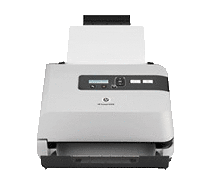
 HP Scanjet 5000 Sheet-Feed Scanner RECONDITIONED

Product Details
Specifications
Accessories
Reviews
Product Details
Product Overview:
Quickly scan workgroup documents using one-touch buttons, task shortcuts, and easy Software with our HP Scanjet 5000 Sheet-feed Scanner.
Main Features:
- Do more in less time by scanning up to 25 pages/minute and 50 images/minute
- Get reliable results with the duty cycle of up to 1,500 pages/day
- Scan faster by selecting settings and getting information on the LCD control panel
- Get sharp, legible scans, and scan at 600 dpi with 48-bit color
- Just press a button to select one- or two-sided scanning
- Streamline common tasks like previewing scans and creating batches with the HP Smart Document Scan software
- Organize and share scanned images with the ScanSoft PaperPort 2 software
- Convert scans to file formats you can search and edit, including Microsoft Word and PDF
- Automatically file converted business cards in an easy-to-use contact database
- Use the included drivers to add this scanner to your document management system
- Save time: eliminate the need to rescan large documents with the double-feed detection feature
- Scan ID cards and embossed cards with the advanced paper-feeding path
- Improve the readability of scanned images by removing unwanted blue, red, and green tones
- Convert paper documents to digital file formats including PDF/A, JPEG, and TIFF
Specifications
GENERAL
-
Max Supported Document Size8.5 in x 34 in
-
ManufacturerHP
POWER DEVICE
-
Power Consumption Operational40 Watt
MEDIA HANDLING
-
Max Document Size8.5 in x 34 in
-
Supported Document Size DetailsADF - up to 8.5 in x 34 in
-
Supported Document TypePlain paper
-
Feeder Capacity50 sheets
-
Document Feeder TypeAutomatic
ENVIRONMENTAL STANDARDS
-
ENERGY STAR CertifiedYes
SYSTEM REQUIREMENTS
-
OS RequiredMicrosoft Windows 2000, Microsoft Windows Vista, Microsoft Windows XP Home Edition, Microsoft Windows XP Media Center Edition, Microsoft Windows XP Professional
SCANNER
-
Optical Resolution600 dpi x 600 dpi
-
Typesheetfed scanner
-
Interface TypeUSB 2.0
-
Form Factordesktop
-
Input Typecolor
-
Document Size ClassOther
-
Max Supported Document Size8.5 in x 34 in
-
Max H-Document Size8.5 m
-
Max V-Document Size34 m
-
Grayscale Depth8-bit (256 gray levels)
-
Color Depth48-bit color
-
Max H-Optical Resolution600 dpi
-
Max V-Optical Resolution600 dpi
-
Supported Document Typeplain paper
-
Document Feeder Typeautomatic
-
Feeder Capacity50 sheets
-
Duty Cycle2000 scans per day
-
Compliant StandardsTWAIN
ENVIRONMENTAL PARAMETERS
-
Min Operating Temperature50 °F
-
Max Operating Temperature95 °F
-
Humidity Range Operating15 - 80%
HEADER
-
BrandHP
-
Product LineHP ScanJet
-
Model5000
-
Packaged Quantity1
-
CompatibilityPC
SUPPORTED DOCUMENT SIZE DETAILS
-
Scanning ModeADF
-
Max Document Size8.5 in x 34 in
DIMENSIONS & WEIGHT
-
Width12.6 in
-
Depth11 in
-
Height9.7 in
-
Weight15.87 lbs
GENERAL
-
ManufacturerHP
Accessories

Reviews


A scanner may cost more due to a lower noise CCD array that delivers cleaner dark colors.
Some sheet-fed scanners can scan double sided.
Most MFPs are designed for scanning documents and so are best to avoid if you're looking for photo scanning. The few exceptions can be recognized if they feature scanning options that are clearly meant for photos, such as a color restore feature.
MY ACCOUNT
INFO & POLICIES
SHOP EASY
PAYMENT OPTIONS



* Images are for illustration purposes only.