



 Shopping Cart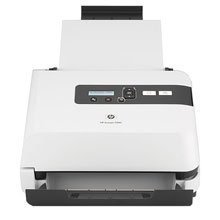

*** ALL TONERS AND SUPPLIES ARE IN STOCK AT DISCOUNTED PRICING , CALL +18882983095..
Printers do not include supplies - toners , drums (Imaging Units) (where applicable) , printer cables , manuals , consumables , trays (where applicable). Power cables are included. Drivers can be downloaded at www.hp.com. Please verify that drivers available are compatible with your software on HP’s site.
Product Details
Specifications
Accessories
Reviews
Product Details
Product Overview:
Streamline workflows and boost productivity with fast, accurate scanning of mixed document types on the HP Scanjet 7000 Document Sheet-Feed Scanner. Time-saving features like unattended two-sided scanning make the HP 7000 the ideal standalone document management solution for your busy office.
Main Features:
- Rapidly scan up to 40 ppm and 80 ipm in black-and-white and grayscale; 35 ppm and 70 ipm in color
- Easily view scan-to shortcuts on the two-line LCD control panel
- Simplify scanner management and save IT time with HP Web Jetadmin software
- Get more done by quickly scanning up to 2000 pages a day
- Feel confident that each document will be scanned thanks to HP Precision Feed technologies
- Digitize business cards, ID cards and embossed cards for easy reference and archiving
- Automatically improve the accuracy of scanned images with Virtual ReScan(R) software
- Enhance the readability of scans by removing unwanted color with the multicolor dropout feature
- Easily send scans to applications like Microsoft(R) Word and e-mail with provided capture software
- Enjoy easy integration with a broad range of document management systems
- Seamlessly integrate the scanner into existing systems with industry-standard drivers
- Get scans to look just the way you want before finalizing with convenient scan preview
- Easily organize, share and print scanned images with drag-and-drop convenience
- Quickly transform documents into editable and shareable digital files with included software
- Automatically convert business cards into an easy-to-use digital contact database
Specifications
Accessories

Reviews


Only scan the part of the image you want - crop any unnecessary parts using the scanner’s built in software features. This saves you time and disk space.
Flatbed scanners have a flat glass surface onto which the original that you wish to scan is placed.
Clean your scanner glass every so often with a glass cleaner.
MY ACCOUNT
INFO & POLICIES
SHOP EASY
PAYMENT OPTIONS



