Contact Us
FAQ |
We will match any price
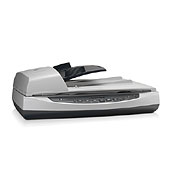
HP Scanjet 8270 Document Flatbed Scanner
*Images may show options not included in price. HP Scanjet 8270 Document Flatbed Scanner customers choose us for our low prices

HP Scanjet 8270 Document Flatbed Scanner

  • Scanner

Model No.:L1975A

Condition:New

Availability: Out Of Stock

Shipping:Ask About Free Shipping!

Perform fast document scanning at up to 25 ppm on the HP Scanjet 8270 Document Flatbed Scanner. The 8270 makes copies easily, using a dedicated one-touch Copy button that sends scans directly to your default printer.

1 1 N/A N/A
Product Image HP Scanjet 8270 Document Flatbed Scanner HP 732-832-7744 310 Park Avenue Lakewood, NJ 08701

$758.49

*** ALL TONERS AND SUPPLIES ARE IN STOCK AT DISCOUNTED PRICING , CALL +18882983095..

Printers do not include supplies - toners , drums (Imaging Units) (where applicable) , printer cables , manuals , consumables , trays (where applicable). Power cables are included. Drivers can be downloaded at www.hp.com. Please verify that drivers available are compatible with your software on HP’s site.

Product Details

Specifications

Accessories

Reviews

Product Details

Product Overview:

Perform fast document scanning at up to 25 ppm on the HP Scanjet 8270 Document Flatbed Scanner. The 8270 makes copies easily, using a dedicated one-touch Copy button that sends scans directly to your default printer.

Main Features:

Fast and productive scanning

  • Easily scan documents at up to 25 ppm
  • Get unattended scans of two-sided pages.
  • Get instant scanner startup, and preview scans within four seconds with patented HP technology.
  • Connect quickly to a single PC via USB or using an optional SCSI module assembly accessory.

    Versatile and easy

  • Easy, versatile scanning for professional-quality documents, images and graphics.
  • Adjust resolution to fit the job, from 150 dpi up to 4800 dpi for professional-quality images.
  • Save time performing common tasks with one-touch buttons.
  • A legal-size, landscape-oriented scanning bed accommodates a variety of paper sizes.

    Office productivity software

  • Use included productivity software and drivers for greater efficiency and speed.
  • Convert scanned documents into editable text, using included OCR software.
  • Seamlessly integrate into existing software and optimize scan speed, using ISIS and TWAIN drivers.
  • Easily file, locate and organize digital documents, using personal document management software
  •  

    Specifications

    Accessories

    Reviews

    • Almost anything that speeds up scanning photos (other than buying a faster scanner) lowers the scan quality, so decide the level of quality you want, and then accept the amount of work that comes with it.

    • Work out the resolution you should scan your photos at by matching it to the resolution you will be printing in.

    • A lot of photo scanners offer a color restore option for restoring color to faded photos.

    * Images are for illustration purposes only.