



 Shopping Cart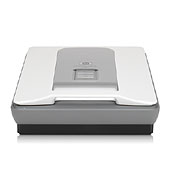

*** ALL TONERS AND SUPPLIES ARE IN STOCK AT DISCOUNTED PRICING , CALL +18882983095..
Printers do not include supplies - toners , drums (Imaging Units) (where applicable) , printer cables , manuals , consumables , trays (where applicable). Power cables are included. Drivers can be downloaded at www.hp.com. Please verify that drivers available are compatible with your software on HP’s site.
Product Details
Specifications
Accessories
Reviews
Product Details
Product Overview:
Industry leading color accuracy using world's first 6-color, 96-bit scanning on the HP Scanjet G4010 Photo Scanner. The G-4010 captures colors that are 40% more accurate than other scanners, for true-to-the-original scans. The G 4010 scans photos, slides and negatives at 4800 x 9600-dpi. Restore photos too.
Main Features:
- Get superior color accuracy and photo reproduction[1] with 6-color, 96-bit scanningexclusive to HP
- Enjoy high-definition scans that make beautiful reprints with 4800 x 9600 dpi resolution.
- Remove red-eye and enhance details in dark photos using HP Real Life technologies.
- Keep a safe, digital record with clear, crisp scans of important family documents and more.
- Get beautiful resultsincluded software removes dust and scratches from photos, slides or negatives.
- Bring old or damaged photos back to life by restoring faded color using included software.
- Scan five 35 mm slides or six photo negative frames at once using a built-in adapter.
- Enjoy quick, easy scanning of multiple photos, slides or negatives, and then save as separate files.
- Quickly and easily scan, make reprints or copy documents and save images at the touch of a button.
- Create PDFs that are easy to file and share via e-mail using a one-touch button.
- Easily organize, edit and e-mail photoswithout large file attachmentsusing HP Photosmart software.
- Quickly transfer scans to your computer using Hi-Speed USBcompatible with USB 2.0 specifications.
Specifications
Accessories
*** ALL TONERS AND SUPPLIES ARE IN STOCK AT DISCOUNTED PRICING , CALL +18882983095
Reviews



Almost anything that speeds up scanning photos (other than buying a faster scanner) lowers the scan quality, so decide the level of quality you want, and then accept the amount of work that comes with it.
If you'll be happy with photo scans that can be viewed onscreen or reprinted at the same size, but with noticeable color shifts and loss of resolution, consider using an inexpensive sheet fed scanner.
If you are scanning an image for your website, scan at 75-100 dpi. This will give you good quality, but small file size.
MY ACCOUNT
INFO & POLICIES
SHOP EASY
PAYMENT OPTIONS



