



 Shopping Cart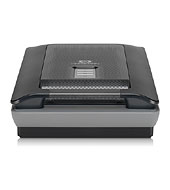

*** ALL TONERS AND SUPPLIES ARE IN STOCK AT DISCOUNTED PRICING , CALL +18882983095..
Printers do not include supplies - toners , drums (Imaging Units) (where applicable) , printer cables , manuals , consumables , trays (where applicable). Power cables are included. Drivers can be downloaded at www.hp.com. Please verify that drivers available are compatible with your software on HP’s site.
Product Details
Specifications
Accessories
Reviews
Product Details
Product Overview:
Industry leading color accuracy using world's first 6-color, 96-bit scanning on the HP Scanjet G4050 Photo Scanner. The G-4050 captures colors that are 40% more accurate than other scanners, for true-to-the-original scans. The G 4050 has a high capacity adapter to scan up to 16 slides or 30 negatives at once.
Main Features:
- Get superior color accuracy and photo reproduction[1] with 6-color, 96-bit scanningexclusive to HP.
- Enjoy high-definition scans that make beautiful reprints with 4800 x 9600 dpi resolution.
- Preserve crisp text in documents with scans that deliver archival-quality results.
- Edit text from scanned documents and magazinessuch as letters and articlesusing included software.
- Scan up to sixteen 35 mm slides or 30 negative framesand other film sizesusing a built-in adapter.
- Remove dust and scratches at the touch of a buttonwithout the need for software touch-ups.
- Bring old or damaged photos back to life by restoring faded color using included software.
- Remove red-eye and enhance details in dark photos using HP Real Life technologies.
- Enjoy quick, easy scanning of multiple photos, slides or negatives, and then save as separate files.
- Quickly and easily scan, make reprints or copy documents and save images at the touch of a button.
- Easily organize, edit and e-mail photoswithout large file attachmentsusing HP Photosmart software.
- Scan more than just flat items to get surprisingly realistic 3-D scans of books and larger items.
Specifications
Accessories
*** ALL TONERS AND SUPPLIES ARE IN STOCK AT DISCOUNTED PRICING , CALL +18882983095
Reviews


Only scan the part of the image you want - crop any unnecessary parts using the scanner’s built in software features. This saves you time and disk space.
Backlight correction, featured on some scanners, can automatically improve photos that were taken with a bright light behind the person.
Make sure the scanning glass is clean and has no dust on it before you start scanning.
MY ACCOUNT
INFO & POLICIES
SHOP EASY
PAYMENT OPTIONS



