



 Shopping Cart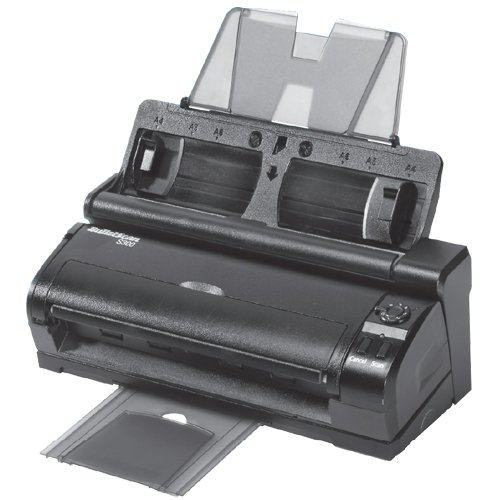

*** ALL TONERS AND SUPPLIES ARE IN STOCK AT DISCOUNTED PRICING , CALL +18882983095..
Printers do not include supplies - toners , drums (Imaging Units) (where applicable) , printer cables , manuals , consumables , trays (where applicable). Power cables are included. Drivers can be downloaded at www.hp.com. Please verify that drivers available are compatible with your software on HP’s site.
Images are for illustration purposes only and do not necessarily reflect the actual product.Product Details
Specifications
Accessories
Reviews
Product Details
Product Overview:
The iVina BulletScan S300 Duplex Color Sheet-Fed Scanner with Detachable Mobile Scanner is two scanners in one, providing a scanning solution for the office and the road. Whether you need to scan business cards, receipts, ID cards, photos, or legal-sized documents, the BulletScan S-300 has you covered--wherever you may be.
Whether you're a business traveler or an office worker, you'll love how the BulletScan S 300 provides a single solution for all your scanning needs. Using a USB 2.0 connection, the BulletScan S300 scans up to 30 images per minute in color at 200 dpi when docked in its 20
When it's time to hit the road, simply undock the S300 BulletScan, and you'll have a USB-powered, easy-to-carry mobile scanner that can read an 8-1/2- by 11-inch document in less than five seconds. You'll be able to easily scan business cards, receipts, ID cards, photos, and other documents you acquire while traveling.
The BulletScan S300 uses a Contact Image Sensor (CIS), scanning at a crisp 600-dpi optical resolution with 48-bit color, 16-bit gray scale, or black-and-white. It also allows for scanning output with 24-bit color, 8-bit gray scale, halftone, dynamic black-and-white, or fixed-threshold black-and-white. With so many options to choose from, the BulletScan S300 ensures you'll always get the scans you want.
BulletScan Manager Software makes it easy for you to control your scanning processes, file formats, and scan-to destinations. The BulletScan S300 includes six scan-to destinations with one-click configuration for scan-to-email, scan-to-print, scan-to-PDF, searchable PDF, and others.
Additionally, BulletScan Manager offers both easy and advanced scan mode settings. In easy mode, default features include auto straighten, auto crop, auto rotate, and edge cleanup. Advanced mode allows for fine tuning of all settings.
The BulletScan S300 is powered by ABBYY FineReader Technology, the same technology used for ABBYY FineReader Desktop OCR, a PC Magazine four-star product. With high optical character recognition accuracy, the BulletScan is able to reduce the size of resulting PDF files without any loss of visual quality. Additionally, the smart software retains text-under-image, text-over-image, text-and-picture, or image-only PDFs.
The FineReader technology has automatic language detection, so you get no-hassle scanning, OCR, and conversion. It automatically detects documents in English, French, Italian, German, and Spanish.
The BulletScan S300 requires a computer with a Pentium 4 or equivalent processor, Windows 7/XP (SP 2)/Vista operating system, 512 MB of RAM (1 GB for Vista), 350 MB of available hard drive space, a CD/DVD-ROM drive, and a USB port.
Main Features:
Specifications
Accessories

Reviews


If your scanner doesn't provide a good quality dust removal feature, removing the dust from your photos with canned air before scanning will take less time than manually removing dust marks with a photo editing program afterwards.
When selecting a scanner it is worth considering how the scanner interfaces with your computer. The interface does not affect the image quality, but it does affect the scanning speed.
Bear in mind that in order to get the best quality, you should scan the original negative rather than the printed photo, if it's available.
MY ACCOUNT
INFO & POLICIES
SHOP EASY
PAYMENT OPTIONS



