



 Shopping Cart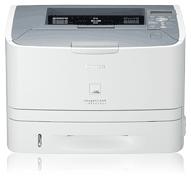

Product Details
Specifications
Accessories
Reviews
Product Details

Efficient and High-quality Black and White Laser Output
Smart Paper Handling
The LBP6650dn boast print speeds of up to 35 pages-per-minute (ppm) for letter-sized output, and delivers Quick First Prints in approximately 6 seconds. The unit also offers a large paper handling of up to 250 pages in a front-loading cassette and provides duplex output for printing professional-quality documents.
Networkable
The imageCLASS LBP6650dn delivers large-office network capabilities in an affordable compact package. It is networkable over an Ethernet, so everyone can easily share printing capabilities directly from their PC.
Single Cartridge System
To deliver high-quality prints and copies, the LBP6650dn incorporates the Canon Single Cartridge System, which combines the toner, drum and development unit in one easy-to-replace cartridge, resulting in excellent image quality retention and eliminating the complication and warehousing of separate toner and drum consumables.
Desktop Solution
The sleek and compact design of the LBP6650dn allows it to conveniently fit on any home desk or table helping you make the most of your workspace and increase productivity.
Professional installation available - please call for pricing
Specifications
Accessories
*** ALL TONERS AND SUPPLIES ARE IN STOCK AT DISCOUNTED PRICING , CALL +18882983095
Reviews


What is Tray Capacity? Tray Capacity or Paper Capacity is the maximum number of pages that can be stored in the printer before you have to refill it.
Printer not working? Check if the heads of the toners are clean or not. They must be cleaned periodically.
Save memory on your PC by choosing the Custom option when you install your printer, and picking just the software you want to install.
MY ACCOUNT
INFO & POLICIES
SHOP EASY
PAYMENT OPTIONS



