



 Shopping Cart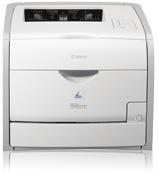

Product Details
Specifications
Accessories
Reviews
Product Details

Fast Quality Color Laser Output
Smart Paper Handling
The LBP7200Cdn boast print speeds of up to 21 pages-per-minute (ppm) in both color and black and white1, and delivers Quick First Prints in approximately 15 seconds. The unit also offers a large paper handling of up to 250 pages in a front-loading cassette plus a standard 50-sheet multipurpose tray and provides duplex output for printing professional-quality documents.
Networkable
The Color imageCLASS LBP7200Cdn delivers large-office network capabilities in an affordable compact package. It is networkable over an Ethernet, so everyone can easily share printing capabilities directly from their PC.
Single Cartridge System
To deliver high-quality prints and copies, the LBP7200Cdn incorporates the Canon Single Cartridge System, which combines the toner, drum and development unit in one easy-to-replace cartridge, resulting in excellent image quality retention and eliminating the complication and warehousing of separate toner and drum consumables.
Professional installation available - please call for pricing
Specifications
Accessories

Reviews


It is always better to use original branded ink cartridges to reduce chances of clogging, leaking and bleeding.
Set your printer for the proper paper type and weight. Fine art papers are heavier than ordinary inkjet or bond papers so set the printer to thicker paper settings.
Paper jam? The best way to remove jammed paper is to gently pull the paper in the direction of the paper path - with power off, of course. Do not pull the paper backwards - you could damage your printer forever by doing so.
MY ACCOUNT
INFO & POLICIES
SHOP EASY
PAYMENT OPTIONS



