



 Shopping Cart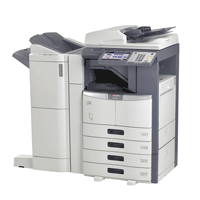

*** ALL TONERS AND SUPPLIES ARE IN STOCK AT DISCOUNTED PRICING , CALL +18882983095..
Printers do not include supplies - toners , drums (Imaging Units) (where applicable) , printer cables , manuals , consumables , trays (where applicable). Power cables are included. Drivers can be downloaded at www.hp.com. Please verify that drivers available are compatible with your software on HP’s site.
Images are for illustration purposes only and do not necessarily reflect the actual product.Product Details
Specifications
Accessories
Reviews
Product Details
Toshiba E-Studio 455 Digital Copier SECURITY ENHANCED
Overview of the Toshiba E-Studio 455
The Toshiba E-Studio 455 Copier is fitted with the most advanced features for the most productive work group environments. The Toshiba E-Studio 455 Copier has out of the box network printing and color scanning capabilities. With the standard networking upgrades, you can plug the Toshiba E-Studio 455 right into your network.
The Toshiba 455 copier is designed for virtually maintenance free copying. The Toshiba E-455 copier first preventative maintenance is at at an incredible 125,000 impressions! The Toshiba E-455 Copier is fast at 45 copies per minute! And only takes 25 seconds to warm up!
The Toshiba E-Studio 455 copier has E-Filing capability! Youcan take a set of documents and store them in the copier and then call them up later for processing and printing! The Toshiba E-455 Copier can also produce 11 x 17 copies!
The Toshiba E-Studio 455 also has a standard 60GB hard drive. You can scan your documents into the Toshiba 455 Copier at a rate of one scan per second.
Main Features of the Toshiba E-Studio 455
Some of these features are optional.
-
Up to 45 PPM
-
Black & White MFP
-
Sml/Med Workgroup
-
Copy, Print, Scan, Fax
-
Secure MFP
-
Eco-Friendly
-
3,200-Sheet Capacity
-
30,000 Toner Yield
-
USB Direct Scan & Print
-
Exceptionally Crisp Output
-
High Speed Auto Duplex
-
Standard Network Printing
-
Add Paper “On the Fly”
-
8.5” Color Touch Screen
-
Energy Star Rated
-
Easily Serviceable Units
-
Super Sleep Mode
-
Secures Print Output
-
Secures Data
-
Creates Secure PDF
-
Controlled Access
-
Color Scanning
-
Compact Footprint
-
Improved Security
-
TopAccess Control
-
e-BRIDGE Technology
-
Improved Ease of Use
-
Super G3 Fax
-
Bluetooth Wireless
-
Saddle Stitch Booklets
-
Stapling & Hole Punch
|
||||||||||||||||||||||||||||||||||||||||||||||||||||||||||||||||||||||||||||||||||||||||||||||||||||||||||||||||||||||||||||||||||||||||||||||||||||||||||||

Professional installation available - please call for pricing
Specifications
Accessories

Reviews


Look at the cost of consumables for your copier before you buy - this will give you an idea of how much it will cost you to run your copier in the future.
Remember to choose double-sided when copying multiple pages in order to save paper.
Is your copy image too light? Manually adjust the copy density to a darker setting.
MY ACCOUNT
INFO & POLICIES
SHOP EASY
PAYMENT OPTIONS



