



 Shopping Cart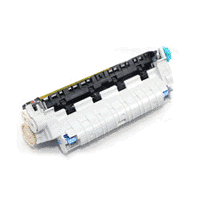

Product Details
Specifications
Accessories
Reviews
Product Details
RM1-1083 - HP Fuser Assembly for LaserJet 4250/4350, 220 Volts This item is used in the following model(s): HP LaserJet 4240n Printer HP LaserJet 4250 Printer HP LaserJet 4250dtn Printer HP LaserJet 4250dtnsl Printer HP LaserJet 4250n Printer HP LaserJet 4250tn Printer HP LaserJet 4350 Printer HP LaserJet 4350dtn Printer HP LaserJet 4350dtnsl Printer HP LaserJet 4350n Printer HP LaserJet 4350tn Printer
Specifications
Accessories
*** ALL TONERS AND SUPPLIES ARE IN STOCK AT DISCOUNTED PRICING , CALL +18882983095
Reviews



After installing a printer, go to the Windows dialog box and check the settings, so you won't be surprised by what happens the first time you print.
Most printers will beep once or twice during or after initialization. If it beeps more than that or beeps constantly, it is telling you that something is wrong. Most printers beep when out of paper or out of ink.
Paper jam? The best way to remove jammed paper is to gently pull the paper in the direction of the paper path - with power off, of course. Do not pull the paper backwards - you could damage your printer forever by doing so.
MY ACCOUNT
INFO & POLICIES
SHOP EASY
PAYMENT OPTIONS



