



 Shopping Cart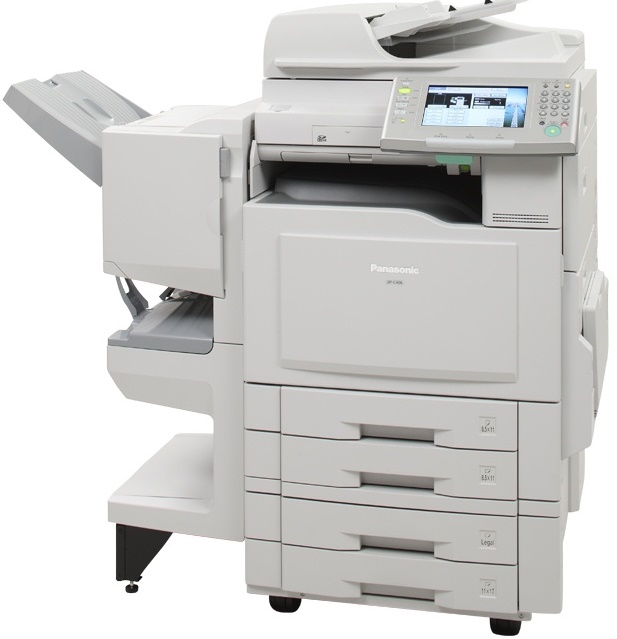

*** ALL TONERS AND SUPPLIES ARE IN STOCK AT DISCOUNTED PRICING , CALL +18882983095..
Printers do not include supplies - toners , drums (Imaging Units) (where applicable) , printer cables , manuals , consumables , trays (where applicable). Power cables are included. Drivers can be downloaded at www.hp.com. Please verify that drivers available are compatible with your software on HP’s site.
Product Details
Specifications
Accessories
Reviews
Product Details
Overview
The Panasonic DP-C266 is the perfect office solution for anyone looking to add color to their documents. With a redesigned print controller enhanced for true office productivity, the Panasonic DP-C266 hosts a 1 GHz PowerPC processor, 512MB of system memory standard which can be upgraded to 768MB and a 160GB High Speed SATA hard disk drive. For convenient, PC free printing the built in SD/USB interface slot allow users to scan and print documents to portable devices. Excellent for mobile smart phones and Portable Digital Assistant (PDA) users who are always on the go! 15-Second Warm-up time 1200 DPI Image Quality SDHC/US Print and Scan Network User Authentication Super Fast 1Ghz Print Controller Customizable 8.5" TFT Touch Panel Display Standard 160GB High Capacity Hard Disk Scan and Print from HDD High Compression PDF Scanning Panasonic's Easy Maintenance Mode Standard Panasonic Document Management Software suite.
Main Features
- 15-Second Warm-up time
- 1200 DPI Image Quality
- SDHC/US Print and Scan
- Network User Authentication
- Super Fast 1Ghz Print Controller
- Customizable 8.5" TFT Touch Panel Display
- Standard 160GB High Capacity Hard Disk
- Scan and Print from HDD
- High Compression PDF Scanning
- Panasonic's Easy Maintenance Mode
- Standard Panasonic Document Management Software suite.
Professional installation available - please call for pricing
Specifications
| Copy / Print | Laser Indirect Electrostatic |
| First Copy Speed | B/W: Approx 6.2 sec (8.5" x 11") (DP-C405) Approx. 6.7 sec (8.5" x 11") (DP-C305) Approx. 7.3 sec (8.5" x 11") (DP-C265) Color: Approx 10.3 sec (8.5" x 11") |
| Print / Copy Resolution | 1,200 dpi x 1,200 dpi (requires optional page memory), 600 dpi x 600 dpi, 300 dpi x 300 dpi |
| Maximum Paper Capacity | Standard 550 sheets paper tray unit x 2 + 100-sheet bypass Max. 2,300 sheets with option |
| Media Type | Paper Tray: 18 to 45 lb (64 to 169g/m2) (Bond Paper) Bypass: 15 to 40 lb (55 to 265g/m2) (Bond Paper) 90 to 140 lb (Index, Coated Paper) |
| Memory Capacity | SD Card max. 32GB (SDHC) USB Storage Device |
| Copy Ratio | Enlargement: (fixed) 200%, 155%, 129%, 121% Reduction: (fixed) 79%, 77%, 65%, 61%, 50% |
| Network Printer Interface | Ethemet 10Base-T/100Base-TX /1000 Base-T |
| Page Description Language | Standard: PCL 6 Emulation Option: Adobe PostScript® 3 |
| Fusing Method | Induction Heating (IH) System |
| Dimensions (Excluding Optional Equipment) | 26.1" x 32.5" x 36.7" (664 x 825 x 933 mm) Including Automatic Document Feeder and ADF mounting bracket |
| Weight (Excluding Optional Equipment) | Approx. 360.8 lb. (164kg) (Excluding optional equipment) |
| Power Requirements | AC 160 V, 60 Hz, 12A |
| Maximum Power Consumption | Max: Less than 1.44 kWh Power saver mode: Approx. 75 Wh Sleep mode: Approx. 35 Wh |
| Network Scanner Interface | Ethernet 10Base-T/100Base-TX |
| Data Format | B/W: TIFF, PDF, Compressed PDF Color: JPEG, PDF, Compressed PDF |
| Computer Server Operating Systems | Windows Vista XP/2000/Server 2003 |
Accessories

Reviews


Do not store paper you are planning to use in a copier or printer in direct sunlight as this will cause it to dry out and fade.
Look out for a copier with an Energy Saving mode which will hibernate into a “sleep” mode when not being used, in order to save electricity.
When buying a copier, make sure you are only paying for functions you really need.
MY ACCOUNT
INFO & POLICIES
SHOP EASY
PAYMENT OPTIONS



