



 Shopping Cart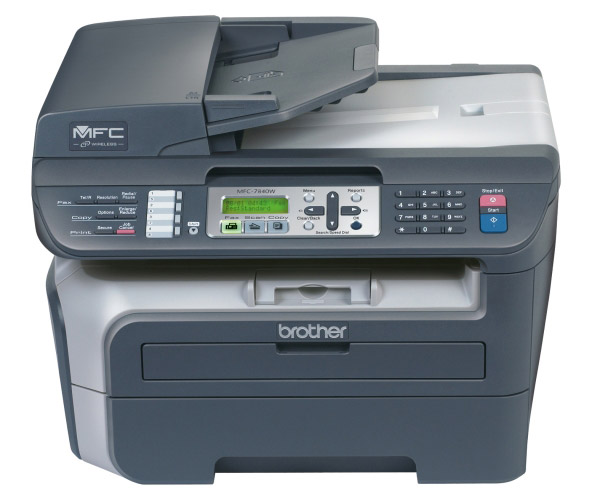

*** ALL TONERS AND SUPPLIES ARE IN STOCK AT DISCOUNTED PRICING , CALL +18882983095..
Printers do not include supplies - toners , drums (Imaging Units) (where applicable) , printer cables , manuals , consumables , trays (where applicable). Power cables are included. Drivers can be downloaded at www.hp.com. Please verify that drivers available are compatible with your software on HP’s site.
Product Details
Specifications
Accessories
Reviews
Product Details
Overview
The MFC 7840W offers everything you need in a monochrome laser all-in-one for your home office or small sized business. The MFC-7840W features an elegant black color scheme while adding a built-in 802.11b/g wireless network interface, PCL®6 and BR-Script3 print emulations, a faster fax modem (33.6K bps Super G3), 4-day memory backup and a LCD backlit display for easy viewing.
Main Features
- Fast printing and copying. Print and copy speeds of up to 23 pages per minute.
- High-quality laser output. Produce crisp, rich black output up to 2400 x 600 dpi print resolution at a low cost per page that laser technology provides you.
- Features a 250-sheet capacity paper tray adjustable for letter or legal size paper. Plus, a single-sheet manual bypass for envelopes, labels or other types of media.
- Flatbed color scanning. Use the document glass to scan pages directly to your e-mail application or to a single PDF file using the ADF.
- 32 MB standard memory. Stores up to 600 pages in memory for faxing and can handle multiple print jobs and copying.
- Wireless, Ethernet, and USB interfaces. You can print, scan or send faxes wirelessly as well as the option to install the MFC on a wired network or to connect locally to a single computer via USB.
- Fold-out rear output tray. Its rear exit door allows for a straight-through paper path and is ideal when using the single-sheet bypass slot for printing envelopes or thicker media.
|
Specifications |
|
|
Print Technology |
B/W Laser Technology |
|
Max. Black Print Speed (ppm) |
23ppm Black |
|
Print Resolution (maximum dpi) |
Up to 2400 x 600 dpi |
|
Standard Input Paper Capacity (sheets) |
250-Sheet Input Capacity |
|
Standard Memory (MB) |
32MB Memory |
|
Maximum Monthly Duty Cycle |
10,000 printed pages |
|
Emulation(s) |
PCL®6 & BR-Script 3 |
|
Copying Capability |
B/W Copying |
|
Best Transmission Speed (sec) |
Approx. 2 seconds per page |
|
Fax Modem Speed |
33.6K bps Fax Modem |
|
Quick Scan (Memory Transmission) |
Approx. 2.5 sec/page |
|
Fax Page Memory |
Up to 600 page fax memory |
|
Max. Black Copy Speed (cpm) |
23cpm Black |
|
Scanning Capability |
B/W & Color Scanning |
|
Max. Interpolated Scan Resolution (dpi) |
Up to 19200 x 19200 dpi |
|
Optical Scan Resolution (dpi) |
600 x 2400 dpi |
|
Machine Noise (Ready/Copying) |
32 dB / 53 dB |
|
Unit Dimensions (W"xD"xH") |
16.9" x 15.6" x 12" |
|
Unit Weight (lbs) |
24.5 lbs. |
|
Power Source |
AC 120V 50/60Hz |
|
Power Consumption - Sleep/Ready/Copying |
10W / 75W / 460W |
|
Energy Star Qualified |
Yes |
|
Model |
MFC 7840W |
Professional installation available - please call for pricing
Specifications
Accessories

Reviews


Printing photos? Make sure that they are of print quality - meaning 300dpi. Anything lower than this will appear pixelated and lower than photo quality.
If your print settings are too dark, it could be detrimental to the life of the cartridge in the long run. It’s important that the density control of the machine be properly set to prevent the machine from pulling too much toner into itself.
After installing a printer, go to the Windows dialog box and check the settings, so you won't be surprised by what happens the first time you print.
MY ACCOUNT
INFO & POLICIES
SHOP EASY
PAYMENT OPTIONS



