



 Shopping Cart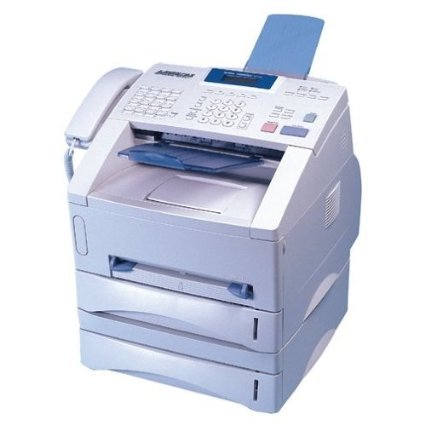

*** ALL TONERS AND SUPPLIES ARE IN STOCK AT DISCOUNTED PRICING , CALL +18882983095.
All reconditioned printers do not include supplies - toners , drums (Imaging Units) (where applicable) , printer cables , manuals , consumables, trays (where applicable). Power cables are included. Drivers can be downloaded . Power cables are included.
Product Details
Specifications
Accessories
Reviews
Product Details
Overview Of The Brother IntelliFax 5750E Laser Fax Machine RECONDITIONED
The reconditioned Brother's IntelliFAX 5750e provides the help you need to handle your printing, faxing, and copying needs and forget about the old days when these tasks overwhelmed your workforce. This network ready, business class Laser Fax with Super G3 33.6K bps modem and 8MB memory with dual access can store up to 600 pages for out of paper reception, QuickScan, auto dialing, and fax broadcasting to up to 282 locations. A paper capacity of up to 500 pages (two 250 sheet trays, 8.5" x 14") and up to 4 day memory back up combined with a high duty cycle and high yield consumables to handle demanding business applications cost efficiently. A built in 10/100 BaseTX Ethernet network print and fax server allows for network connectivity now or in the future. Delivering high speed laser performance and reliability at low operating costs, this convenient machine also copies at up to 15 copies a minute, sorts, enlarges and reduces. Several projects can be handled at just one station, making you and your office more productive and efficient.
Main Features Of The Brother IntelliFax 5750E Laser Fax Machine RECONDITIONED
Fax Speed: 33.6K bps
Transmission Speed: 2 Seconds Per Page
Print Speed: 15 ppm
Paper Handling: 500 Page Input Capacity which consists of: 2 x 250 Sheet Trays (8.5" x 14" Max Size) Plus 50 Sheet ADF
Memory: 8MB (600 Pages)
Resolution: 600 x 600 dpi, (203 x 392 dpi, Fax)
Specifications
Accessories

Reviews


Since faxes are not usually "print quality" you may want to consider using cheaper paper than you use in your printers and copiers.
If you open up the printer door of a fax machine because you are experiencing problems and you see bits of dry toner lying around, the toner cartridge should be removed and given a shake. If the toner falls out of the cartridge, you should buy a new one.
Usually the fax machine will have some sort of indicator when the toner is low.
MY ACCOUNT
INFO & POLICIES
SHOP EASY
PAYMENT OPTIONS



