



 Shopping Cart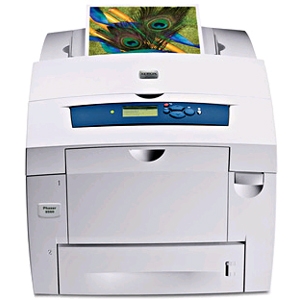

*** ALL TONERS AND SUPPLIES ARE IN STOCK AT DISCOUNTED PRICING , CALL +18882983095..
Printers do not include supplies - toners , drums (Imaging Units) (where applicable) , printer cables , manuals , consumables , trays (where applicable). Power cables are included. Drivers can be downloaded at www.hp.com. Please verify that drivers available are compatible with your software on HP’s site.
Images are for illustration purposes only and do not necessarily reflect the actual product.Product Details
Specifications
Accessories
Reviews
Product Details
Overview Of The Xerox Phaser 8560N Color Laser Printer RECONDITIONED
The Xerox 8560N printer, as with all our products is cleaned, tested and working, and has passed the clean test copy.
The Xerox Phaser 8560/N offers a busy workgroup the fast, affordable and easy to use color printing they need. Count on superior and reliable prints on every kind of media, from cover stock to recycled paper. Handle your projects in house and reduce costs and increase efficiency.
The Phaser 8560 series produces fast and versatile prints for everyday jobs and is always ready to tackle large, data intensive projects. Enjoy black and white or full color prints at speeds up to 30 pages per minute. A 600 MHz processor and an integrated 256 MB of RAM means you'll never be standing around waiting for the simplest of print jobs to complete.
The Phaser 8560/N features an integrated Fast Ethernet adapter, so you'll be able to connect to your network right out of the box. Affordable power for the busiest office!
Main Features Of The Xerox Phaser 8560N Color Laser Printer RECONDITIONED
- Print Speed: 30 ppm Black, 30 ppm Color
- Resolution: 2400 enhanced dpi
- First page out in 5 seconds
- Paper Handling: 625 Sheet Input Capacity Consists of: 1 x 100 Sheet Multipurpose Tray, 1 x 525 Multipurpose Tray
- Memory: 256 MB (1 GB Max)
- Connectivity: USB 2.0 and 10/100Base-TX Ethernet
- Environments: PC, Mac and Linux Compatible
All our reconditioned printers are clean, tested and working.
Specifications
Accessories

Reviews


Media settings on your printer determine how much ink will be used. Thinly coated glossy films require less ink, while plain paper soaks in more.
Make sure to keep your printer up to date by downloading drivers and patches from the manufacturer's site. Most manufacturers provide driver updates for their units which include patches that add fonts or fix incompatibilities.
Save memory on your PC by choosing the Custom option when you install your printer, and picking just the software you want to install.
MY ACCOUNT
INFO & POLICIES
SHOP EASY
PAYMENT OPTIONS



