



 Shopping Cart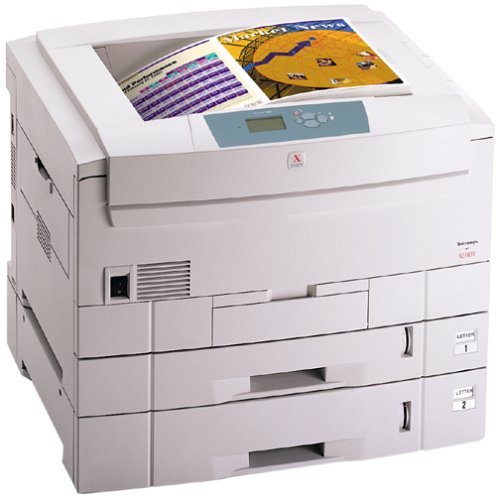

*** ALL TONERS AND SUPPLIES ARE IN STOCK AT DISCOUNTED PRICING , CALL +18882983095..
Printers do not include supplies - toners , drums (Imaging Units) (where applicable) , printer cables , manuals , consumables , trays (where applicable). Power cables are included. Drivers can be downloaded at www.hp.com. Please verify that drivers available are compatible with your software on HP’s site.
Product Details
Specifications
Accessories
Reviews
Product Details
Overview Of The Xerox Phaser 7300DN Color Laser Printer RECONDITIONED
The Xerox 7300DN printer, as with all our products is cleaned, tested and working, and has passed the clean test copy.
The Phaser 7300 is the fastest color printer in the line up. Imagine the end of clogged print jobs and time consuming waits at the printer. This printer cranks out color at 30 pages per minute (ppm) and black-and-white documents print at 37 ppm.
At 600 dot-per-inch (dpi) resolution, the Phaser 7300 prints sharper text and finer lines-ideal for color drawings, flow charts, schedules, spreadsheets, and marketing materials. The auto-thickness sensor adjusts the fuser temperature to the paper type so you get a consistent look whether you're printing on recycled paper, bond stock, or glossy paper.
The Phaser 7300 uses a 500 MHz processor, which means many employees can use the same printer efficiently and Print on a wide range of paper sizes, including custom paper up to 12" x 36" (banner size).
Main Features Of The Xerox Phaser 6200N Color Laser Printer 16 ppm RECONDITIONED
- Print Speed: 37 ppmBlack, 30 ppm Color
- Resolution: 2400 dpi
First page out in 13 seconds - PaperHandling: 650 Sheet Input Capacity Consists of:
1 x 100 Sheet Multipurpose Tray
1 x 550 Sheet Standard Tray - Features: AutoDuplex Unit, Wide Format (Up to 12" x 18")
- Memory: 192 MB(512 MB Max.)
- Connectivity: Parallel, USB and 10/100 Base-TX Ethernet
- Environments: PC and Mac Compatible
All our reconditioned printers are clean, tested and working.
Specifications
Accessories

Reviews


What is dpi? Dpi is used to describe the resolution number of dots per inch in a digital print. The higher the numbers, the more detailed the print image is.
Getting blank pages after you installed a new cartridge? Check that the sticker from the cartridge was properly removed. Alternatively, run the clean print head function to make sure all air bubbles are removed. Do not remove the cartridge once it has been installed.
If debris is the primary cause of failures, toner is the primary cause of debris. All toner cartridges release a small amount of toner powder into the machine. This is why it's important to clean the machine when you change the cartridge.
MY ACCOUNT
INFO & POLICIES
SHOP EASY
PAYMENT OPTIONS



