



 Shopping Cart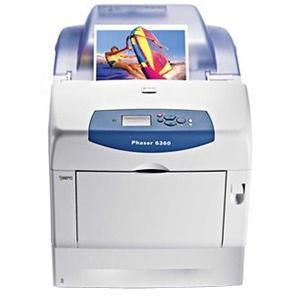

*** ALL TONERS AND SUPPLIES ARE IN STOCK AT DISCOUNTED PRICING , CALL +18882983095..
Printers do not include supplies - toners , drums (Imaging Units) (where applicable) , printer cables , manuals , consumables , trays (where applicable). Power cables are included. Drivers can be downloaded at www.hp.com. Please verify that drivers available are compatible with your software on HP’s site.
Images are for illustration purposes only and do not necessarily reflect the actual product.Product Details
Specifications
Accessories
Reviews
Product Details
Overview Of The Xerox Phaser 6360DN Color Laser Printer RECONDITIONED
The Xerox 6360DN printer, as with all our products is cleaned, tested and working, and has passed the clean test copy.
High performance color laser printers reach a new standard with the Xerox Phaser 6360DN. The Xerox Phaser 6360 leads the industry with best in class print speed and exceptional color performance. The ease of operation and fantastic engineering meet the exacting demands of high volume office environments, the Phaser 6360 is the only choice.
Imagine a color laser printer that delivers 42 pages per minute in color, so fast you'll do all of your printing in house. An unheard of 1 GHz processor and 256 MB of integrated memory means you will stay efficient and enjoy a first page out time of 9 seconds.
The 6360DN also features automatic two side printing for added efficiency and convenience. With ultra-fast setup and seamless operation, the Phaser 6360DN printer delivers unbeatable ease-of-use for any workgroup.
Main Features Of The Xerox Phaser 6360DN Color Laser Printer RECONDITIONED
- Print Speed: 42 ppm Black, 42 ppm Color
- Resolution: Up to 2400 x 600 dpi
- First page out in 9 seconds
- Paper Handling: 600 Sheet Input Capacity Consists of: 1 x 150 Sheet Multipurpose Tray, 1 x 550 Sheet Multipurpose Tray
- Memory: 256 MB
- Connectivity: USB 2.0, Fast Ethernet
- Environments: PC, Mac and Linux Compatible
All our reconditioned printers are clean, tested and working.
Specifications
Accessories

Reviews


Printing photos? Make sure that they are of print quality - meaning 300dpi. Anything lower than this will appear pixelated and lower than photo quality.
Allow ink to dry completely to avoid smudging. The time will vary based on the ink and paper quality used as well as the temperature and humidity conditions.
Media settings on your printer determine how much ink will be used. Thinly coated glossy films require less ink, while plain paper soaks in more.
MY ACCOUNT
INFO & POLICIES
SHOP EASY
PAYMENT OPTIONS



