



 Shopping Cart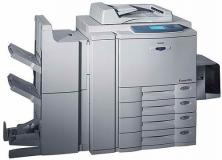

*** ALL TONERS AND SUPPLIES ARE IN STOCK AT DISCOUNTED PRICING , CALL +18882983095..
Printers do not include supplies - toners , drums (Imaging Units) (where applicable) , printer cables , manuals , consumables , trays (where applicable). Power cables are included. Drivers can be downloaded at www.hp.com. Please verify that drivers available are compatible with your software on HP’s site.
Product Details
Specifications
Accessories
Reviews
Product Details
Overview Of The Toshiba E-Studio 210C Digital Copier RECONDITIONED
Toshiba E-Studio 210C incorporate breakthrough Toshiba color imaging technology that offers professional graphics and advanced network capabilities that can be shared across workgroups, departments and the internet. The network connected color printing and scanning allows users to scan-to-queue, scan-to-email and scan-to-mailbox with easy web retrieval.
Main Features Of The Toshiba E-studio 210C Digital Copier RECONDITIONED
-
First Copy Time: 9.5 Seconds
-
Max Orig. Copy: 11 x 17
-
Copies per minute: 21 CPM Color and 31 CPM B/W
-
Staple Sorter: 2 trays
-
Paper Trays: Dual 600 Sheet Trays
-
Auto Duplex
-
Network Print
-
Scanning
Professional installation available - please call for pricing
Specifications
Accessories

Reviews


The best way to store paper for copying is in its wrapper. This will prevent it absorbing moisture from the air which would make it damp.
Copiers can take up a large amount of office space. Make sure you measure the room you intend to use the copier in and check it will fit properly.
You might want to look out for an automatic duplexer on you copier, which will allow you to print double sided without any hassle.
MY ACCOUNT
INFO & POLICIES
SHOP EASY
PAYMENT OPTIONS



