



 Shopping Cart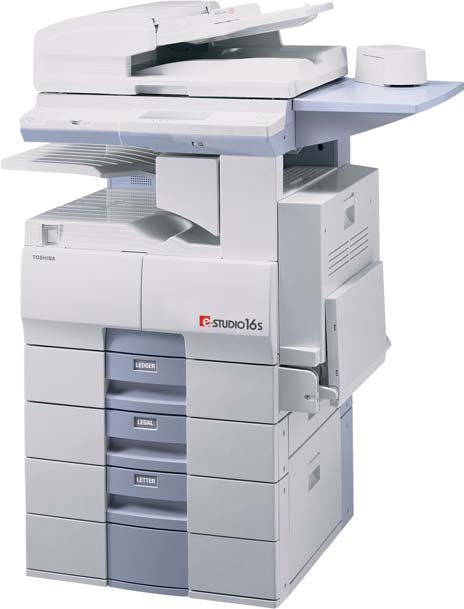

*** ALL TONERS AND SUPPLIES ARE IN STOCK AT DISCOUNTED PRICING , CALL +18882983095..
Printers do not include supplies - toners , drums (Imaging Units) (where applicable) , printer cables , manuals , consumables , trays (where applicable). Power cables are included. Drivers can be downloaded at www.hp.com. Please verify that drivers available are compatible with your software on HP’s site.
Images are for illustration purposes only and do not necessarily reflect the actual product.Product Details
Specifications
Accessories
Reviews
Product Details
Overview Of The Toshiba E-Studio 16s Digital Copier RECONDITIONED
The versatile e-STUDIO16S is Toshiba's newest 16-Page Per Minute multifunction digital copier featuring a full array of optional network printing, faxing, and scanning capabilities. The modular design of the e-STUDIO16S enables growing businesses and workgroups to create a customized document imaging system perfectly suited to their current and future office productivity requirements.
The scalability and exceptional digital output of the e-STUDIO16S makes it price-competitive with other copiers in its class. Its economical multifunction design provides a significantly lower Total Cost of Ownership (TCO) compared to the purchase price of four separate copiers, printer, fax, and scanner devices.
The compact e-STUDIO16S is ideal for small businesses and workgroups that require multifunction features in space-limited environments. The reliable e-STUDIO16S digital copier system offers exceptional image quality, user-friendly features, and state-of-the-art digital technology, at a very affordable price.
Main Features Of The Toshiba E-Studio 16s Digital Copier RECONDITIONED
-
First Copy Time: 7.9 Seconds
-
Max Orig. Copy: 11 x 17
-
Copies per minute: 16
-
Paper Trays: (2) 550 Sheet Drawers
-
Auto Duplexing
-
Integrated Fax
Professional installation available - please call for pricing
Specifications
Accessories

Reviews


Copiers can take up a large amount of office space. Make sure you measure the room you intend to use the copier in and check it will fit properly.
Paper left in the feed tray of the copier for a long time can dry and curl causing jams.
When buying a copier, make sure you are only paying for functions you really need.
MY ACCOUNT
INFO & POLICIES
SHOP EASY
PAYMENT OPTIONS



