



 Shopping Cart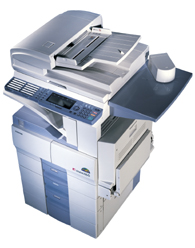

*** ALL TONERS AND SUPPLIES ARE IN STOCK AT DISCOUNTED PRICING , CALL +18882983095..
Printers do not include supplies - toners , drums (Imaging Units) (where applicable) , printer cables , manuals , consumables , trays (where applicable). Power cables are included. Drivers can be downloaded at www.hp.com. Please verify that drivers available are compatible with your software on HP’s site.
Product Details
Specifications
Accessories
Reviews
Product Details
Overview Of The Toshiba E-Studio 160 Digital Laser Copier RECONDITIONED
The e-STUDIO160 digital photocopier and multifunctional system is part of the new generation Toshiba e-STUDIO line designed to meet increasing market demand for integrated office equipment with fax capabilities and PC/ Intranet/Internet connectivity, in addition to increased functionality for total document management. This specific unit is targeted to the needs of small workgroups.
Main Features Of The Toshiba E-Studio 160 Digital Laser Copier RECONDITIONED
-
First Copy Time: 7.9 Seconds
-
Max Orig. Copy: 11 x 17
-
Copies per minute: 16
-
Paper Trays: (2) 550 Sheet Drawers
-
Auto Duplexing
-
Integrated Fax
Professional installation available - please call for pricing
Specifications
Accessories

Reviews


The best way to store paper for copying is in its wrapper. This will prevent it absorbing moisture from the air which would make it damp.
Look out for a copier with an Energy Saving mode which will hibernate into a “sleep” mode when not being used, in order to save electricity.
Do not mix two types of paper in one tray of the copier.
MY ACCOUNT
INFO & POLICIES
SHOP EASY
PAYMENT OPTIONS



