



 Shopping Cart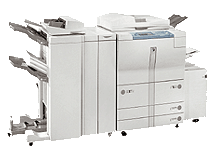

*** ALL TONERS AND SUPPLIES ARE IN STOCK AT DISCOUNTED PRICING , CALL +18882983095..
Printers do not include supplies - toners , drums (Imaging Units) (where applicable) , printer cables , manuals , consumables , trays (where applicable). Power cables are included. Drivers can be downloaded at www.hp.com. Please verify that drivers available are compatible with your software on HP’s site.
Images are for illustration purposes only and do not necessarily reflect the actual product.Product Details
Specifications
Accessories
Reviews
Product Details
Overview Of The Canon IR 8500 Digital Copier RECONDITIONED
The imageRUNNER 8500 is a high-volume digital production system that sets new standards for speed, performance, reliability, and document finishing. Its 85 page-per-minute speed, combined with a monthly duty cycle of 400,000 impressions, make it ideal for the most demanding production environments.
The imageRUNNER 8500 ships standard as a standalone digital copier, but can be easily upgraded to deliver network printing and scanning capabilities. In addition, the imageRUNNER 8500 supports Canon's Universal Send capability, which allows users to scan and "push" documents via communicating machines, including e-mail, I-Fax, FTP and local area networks.
Main Features Of The Canon IR 8500 Digital Copier RECONDITIONED
-
85 pages per minute
-
Copy originals up to 11 x 17"
-
Automatic duplexing
-
4,150 Sheet paper capacity
-
3,500 Sheet paper deck (optional)
-
Reduction and enlargement: 25 - 400%
-
Electronic sorting
-
Scan, email and internet faxing (optional)
-
Network printing/scanning (optional)
-
2/3 hole punch finisher (optional)
-
Stapling finisher (optional)
-
Paper folding (optional)
-
Saddle stitch finisher (optional)
-
Monthly copy volume up to 400,000
Professional installation available - please call for pricing
Specifications
Accessories

Reviews


Remember to choose double-sided when copying multiple pages in order to save paper.
If you know that you will need to collate or separate your copies, make sure your copier includes a sorter or finisher.
Copiers can take up a large amount of office space. Make sure you measure the room you intend to use the copier in and check it will fit properly.
MY ACCOUNT
INFO & POLICIES
SHOP EASY
PAYMENT OPTIONS



