



 Shopping Cart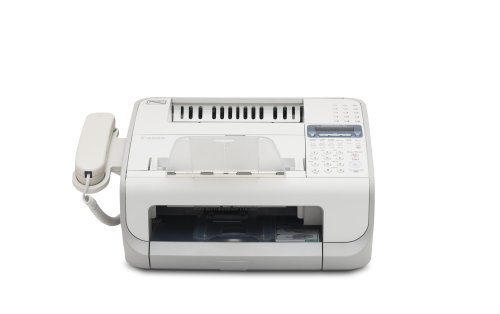

*** ALL TONERS AND SUPPLIES ARE IN STOCK AT DISCOUNTED PRICING , CALL +18882983095..
Printers do not include supplies - toners , drums (Imaging Units) (where applicable) , printer cables , manuals , consumables , trays (where applicable). Power cables are included. Drivers can be downloaded at www.hp.com. Please verify that drivers available are compatible with your software on HP’s site.
Product Details
Specifications
Accessories
Reviews
Product Details
Overview of the Canon L90 Laser Fax Machine Reconditioned
The FAXPHONE L90 combines the performance of a laser facsimile and a laser printer together for your small business or personal desktop. With the latest fax capabilities and a 15 page-per-minute laser printer, this stylish, low profile machine functions in the place of two devices.
With features such as Super G3 facsimile technology, and large 346-page fax memory, the FAXPHONE L90 surpasses single function fax machines.
Printed faxes and documents will both have the same result – quality laser output. The FAXPHONE L90 is the smart choice for desktop laser facsimile and printing performance.
Main Features of the Canon L90 Laser Fax Machine Reconditioned
-
33.6 Kbps Super G3 fax
-
15 pages-per-minute quality laser output; 13 cpm copy speed
-
600 dpi print resolution
-
346-page memory
-
Telephone handset included
-
15 one-touch dials, 100 coded dials
-
-
Efficient energy saving mode; approximately 3W of energy used
-
Single Cartridge System
| Specifications For the Canon L90 Laser Fax Machine Reconditoned | |
| Print Speed (up to) | Black: Up to 15 ppm/13 cpm (letter) |
| Print Resolution (up to) | Black: Up to 600 x 600 dpi |
| Ink Compatibilty | Canon Cartridge 104 (Yield 2,000 pages*) Maximum Duty Cycle: 7,500 pages |
| Paper Sizes | Letter/Legal/A4 |
| Output Tray Capacity | 150 sheets |
| Modem Speed | 33.6 Kbps (Super G3) |
| Transmission Speed (approx.) | Approx. 3 seconds/page |
| Transmission/Reception Memory | Up to 346 pages |
| Receive Options | Fax Only, Manual, Answering, DRPD, Fax/Tel Auto Switch |
| Dialing | 15 one-touch speed dials/100 coded dials |
| 50 destinations x 15 dials | |
| Up to 131 destinations | |
| Yes | |
| Fax Resolution | Up to 203 x 391 dpi (super fine) |
| Standard Interface | USB 2.0 Hi-Speed |
| OS Compatibility | Windows Vista®, XP, 2000, Mac® OS X 10.2.8-10.6 |
| Power Consumption (approx.) | 610W (Max), 3W (Energy Saver Mode) |
| Dimensions (W x D x H) | 19.1"(W) x 22.8"(D) x 12.8"(H) |
| Software Included | Canon UFR II LT |
| Weight | Approx. 18.4 lbs. |
| Model | Canon L90 |
Specifications
Accessories
*** ALL TONERS AND SUPPLIES ARE IN STOCK AT DISCOUNTED PRICING , CALL +18882983095
Reviews




If you open up the printer door of a fax machine because you are experiencing problems and you see bits of dry toner lying around, the toner cartridge should be removed and given a shake. If the toner falls out of the cartridge, you should buy a new one.
If you discover lines across the pages you are sending, clean the scan glass if it is accessible.
When receiving an important piece of paper, it is office etiquette to let the sender know that you received the fax.
MY ACCOUNT
INFO & POLICIES
SHOP EASY
PAYMENT OPTIONS



