



 Shopping Cart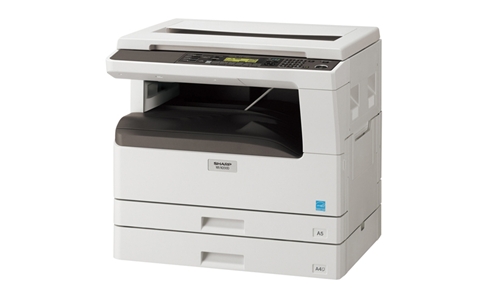

*** ALL TONERS AND SUPPLIES ARE IN STOCK AT DISCOUNTED PRICING , CALL +18882983095..
Printers do not include supplies - toners , drums (Imaging Units) (where applicable) , printer cables , manuals , consumables , trays (where applicable). Power cables are included. Drivers can be downloaded at www.hp.com. Please verify that drivers available are compatible with your software on HP’s site.
Product Details
Specifications
Accessories
Reviews
Product Details
Overview Of The Sharp MX-M200D Digital Multifunction Copier
Thanks to Sharp, just one powerful document solution is all you need to keep pace with today’s high-speed, graphic-intensive business communications. The compact, user-friendly MX-M200D delivers ultra-efficient copying/printing, brilliant color scanning, and optional Super G3 faxing to boost productivity while covering all your basic office needs. Plus, adding powerful network printing and full-color network scanning options gives the MX-M200D the functionality to grow along with your business.
|
Specifications |
|
|
Type |
Desktop |
|
Engine speed |
Max. 20/16 cpm/ppm (A4) |
|
Paper size |
Max. A3, min. A6 |
|
Paper capacity (80 g/m2) |
MX-M200D: 600 sheets (250 x 2 + 100), max. 1,100 sheets |
|
Paper weight |
Tray: 56 g/m2 to 90 g/m2 |
|
Warm-up time |
Less than 45 sec. |
|
Memory |
MX-M200D/M160D: 48MB (shared) Optional memory: 256MB (MX-ARSM5) |
|
Power requirements |
230 - 240V AC, 550/60 Hz |
|
Power consumption (max.) |
1.2 kW |
|
Dimensions (W x D x H)*1 |
MX-M200D: 590 x 574 x 522 mm MX-M160D: 590 x 574 x 437 mm |
|
Weight (approx.)*1 |
MX-M200D: 33.0 kg MX-M160D: 28.1 kg |
|
Features |
Toner save mode, pre-heat/auto power shut-off modes, copy/print/scan user control*2 (50 accounts total) |
|
COPIER |
|
|
Original paper size |
Max. A3 |
|
First copy time*3 |
7.2 sec. |
|
Continuous copy |
Max. 999 copies |
|
Resolution |
Scan: 600 x 600 dpi (Photo mode), 600 x 300 dpi (Auto/Text mode) Print: 600 x 600 dpi |
|
Gradation |
Scan: 256 levels Print: 2 levels |
|
Zoom range |
25% to 400% (50% to 200% using RSPF/SPF) in 1% increments |
|
Preset copy ratios |
10 ratios (5 reduction + 5 enlargement) |
|
Features |
Auto paper selection, auto magnification selection, auto tray switching, rotation copy, Scan Once/Print Many, electronic sorting, original paper size input, 2-sided copy orientation change, margin shift, XY zoom, edge/centre erase, dual page copy, interrupt, stream feeding, multi-shot (4-in-1, 2-in-1), card shot, duplex copy, offset stack |
|
PRINTER |
|
|
Resolution |
600 x 600 dpi |
|
Interface |
USB 2.0 |
|
Supported OS |
Windows® 2000/XP, Windows Vista® |
|
PDL (emulation) |
Standard: SPLC (Sharp Printer Language with Compression) Option*4: PCL 6/5e emulation, PS3 emulation |
|
Available fonts |
80 fonts for PCL, 136 fonts for PS3 emulation |
|
Features |
RIP Once/Print Many, duplex print, N-up (2/4/6), fit to page, image orientation, auto paper selection, rotation print, output tray selection, image adjustment, pure black and white, watermarks, status window, offset print |
|
COLOR SCANNER |
|
|
Scan method |
Push scan (via control panel), pull scan (TWAIN-compliant application) |
|
Resolution*5 |
Push scan: 75, 100, 150, 200, 300, 400, 600 dpi Pull scan: 75, 100, 150, 200, 300, 400, 600 dpi 50 to 9,600 dpi via user setting |
|
Interface |
USB 2.0 |
|
Supported OS |
Windows® 2000/XP, Windows Vista® |
|
Scanner utilities |
Button Manager, Sharpdesk |
|
Network Printing/Scanning (optional MX-NB10 required) |
|
|
Network interface |
USB 2.0, 10Base-T/100Base-TX |
|
Supported OS*6
|
Windows® 2000/XP, Windows Server® 2003/2008, Windows Vista® Mac OS 9.0 to 9.2.2, Mac OS X 10.2.8, 10.3.9, 10.4.11, 10.5 to 10.5.6 |
|
Network protocols*6 |
TCP/IP, IPX/SPX (NetWare), NetBEUI, EtherTalk (AppleTalk) |
|
File formats |
PDF, TIFF, JPEG |
|
Print resolution |
600 dpi, 300 dpi*7 |
|
Scan resolution*5 |
75, 100, 150, 200, 300, 400, 600 dpi |
|
Memory |
64MB, expandable to max. 320MB with SO-DIMM 256MB (144-pin) |
|
Features*8 |
Printer administration utility, printer status monitor, LDAP support, IP/MAC address filtering, port/protocol management, direct PDF/TIFF printing, barcode font compatibility, font/form download, network scan (scan to e-mail/FTP server/desktop) |
Professional installation available - please call for pricing
Specifications
Accessories

Reviews


Copiers are an important investment for your business. Take the time to ask advice from a copier expert.
Do not store paper you are planning to use in a copier or printer in direct sunlight as this will cause it to dry out and fade.
What is PPM? The speed of your copier in pages per minute. This is sometimes referred to as CPM - copies per minute.
MY ACCOUNT
INFO & POLICIES
SHOP EASY
PAYMENT OPTIONS



