



 Shopping Cart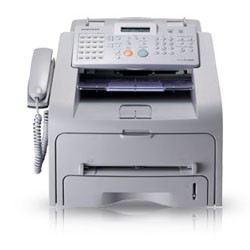

*** ALL TONERS AND SUPPLIES ARE IN STOCK AT DISCOUNTED PRICING , CALL +18882983095..
Printers do not include supplies - toners , drums (Imaging Units) (where applicable) , printer cables , manuals , consumables , trays (where applicable). Power cables are included. Drivers can be downloaded at www.hp.com. Please verify that drivers available are compatible with your software on HP’s site.
Product Details
Specifications
Accessories
Reviews
Product Details
Overview
We’ve got you covered with the new SAMSUNG and SF-560R’s total biz solution. Make SAMSUNG’s SF-560R your partner and we’ll show you how a multi-function digital laser fax, copier & scanner can communicate with your work environment to help you and your work go faster, whether it's a place of business or your own home office. For ease of use for business in the real world.
Main Features
Powerful Performance
The Need for Speed Fax With a quick 33.6 Kbps fax TX our contribution to your speed will be significant and the 2MB of memory stores up to 160 pages of information. Copy Capacity for Quickness SAMSUNG sets the pace with a remarkably fast copy speed at up to 16 pages / minute (A4) and greater paper capacity with a convenient.
Paper Saving
Combine two or four originals on one page.
Refined and Robust Design
Space-illuminating style the refined two tone color design of white and grey brightens up any work place, whilst freeing up your valuable desk space with its compact size. Effortless No more fuss. Toner and paper replacement couldn't be easier with easy front-out access panels.
| Specifications | |
| Copy | |
| Speed | Up to 16 ppm in A4 (17 ppm in Letter) |
| Resolution | 200 x 300 dpi |
| First Copy Out Time (Mono) | 30 seconds (from Stand by mode) |
| Zoom Rate | 50~150% |
| Multy Copy | 1~99 pages |
| Scan | |
| Method | Mono CIS |
| Resolution (Optical) | 200 x 200 dpi |
| Fax | |
| Compatibility | ITU-T Group 3, ECM |
| Modem Speed | 33.6 Kbps |
| Resolution | Max. 203 x 392 dpiStandard : 203 x 98 dpiFine : 203 x 196 dpiSuper Fine : 203 x 392 dpiPhoto : 203 x 196 dpi |
| Memory | 2 MB (Approx. 160 pages at ITU-T #1 Chart) |
| Auto Dial | 1-touch dial : 20 LocationsSpeed dial : 80 Locations |
|
|
|
| Input Capacity and Types | 250-sheet Cassette Tray (75 g/‡u, 20 lbs), 1-sheet Manual Tray (60 ~ 120 g/‡u, 16 ~ 32 lbs) |
| Output Capacity and Types | 150-sheet Face Down, 1-sheet Face Up |
| Media Size | for fax and copy: Letter, A4, Legal |
| Media Type | Tray : Plain PaperManual Tray : Plain Paper, Transparency |
| ADF Capacity | 20 sheets (Letter / A4, 20 lb / 75 g/‡u) |
| ADF Document Size | Width: 142 ~ 216mm (5.6"~8.5")Length: 148 ~ 356mm (5.8" ~ 14.0") for Single page scan 148 ~ 356mm (5.8" ~ 14.0") for Multi pages scan |
| General | |
| LCD | 2 lines x 16 characters |
| Memory / Storage | 8 MB |
| Noise Level | Warm up : Less than 52 dBAStand by : Less than 39 dBAPrinting : Less than 52 dBA |
| Duty Cycle, Monthly | Up to 10,000 pages |
| Dimension (W x D x H) | 17" x 16.6" x 13.7" |
| Weight | 9.7 Kg (21.3 Lbs.) |
| Consumables | |
| Yield | Average Cartridge Yield 3,000 standard pages.Declared yield value in accordance with ISO/IEC 19752(Ships with 1,000 pages Starter Toner Cartridge) |
| Type | Single Cartridge |
| Model Code | SCX-4216D3 |
Specifications
Accessories
*** ALL TONERS AND SUPPLIES ARE IN STOCK AT DISCOUNTED PRICING , CALL +18882983095
Reviews


When receiving a fax, ensure the fax machine is plugged in, powered on and connected to a working phone jack.
If there are blank areas on received pages, change the cartridge and try again.
Having issues with your paper feeder? Clean the document feed rollers and pad with a rag and water or light window cleaner.
MY ACCOUNT
INFO & POLICIES
SHOP EASY
PAYMENT OPTIONS



