



 Shopping Cart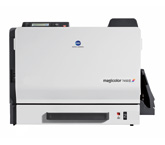

Product Details
Specifications
Accessories
Reviews
Product Details
Konica Minolta magicolor 7450 II office color printers produce extraordinary image quality - in color or B&W and are equipped to handle a diverse range media to suit your business printing needs.
Overview
The Konica Minolta Magicolor 7450-II Color Laser Printer is designed to output professional quality printing for in-house businesses. The Magicolor 7450 II prints up to 24.5 ppm in both color and B&W and is able to create documents in sizes ranging from 3.55" x 5.50" to 12.25" x 47.24".
-
Office color printers come standard with a 733 MHz G4 processor; Emperon Technology and custom acceleration hardware
-
Gigabit Ethernet interface provides networking capabilities across Windows, Macintosh and Linux platforms. The magicolor 7450 II supports PostScript 3 (v3016) and PCL 6 emulations for seamless processing of all your color documents.
Other Features Include:
-
9600 x 600 dpi-class resolution and Simitri Polymerized Toner generate true-to-life photographic detail, smooth gradients, and saturated color.
-
Enhanced Automatic Image Density Control (eAIDC) assures consistent color on every print, every day.
-
Broad media support, including weights up to 140 lb. index (256 g/m2), provides enormous flexibility for brochure printing, promotional publishing, and commercial-quality documents.
-
Color office printers offer a 120,000 print monthly duty cycle and a maximum paper input capacity of 1,850 sheets.
Main Features:
-
Color: 24 ppm
-
B&W: 24 ppm
-
9600 x 9600 dpi
-
256MB RAM
-
Ethernet/USB and Parallel
-
Up to 12.25"x48"
-
100 sheet mpt
-
250 sheet input
Specifications
Accessories

Reviews


Set your printer for the proper paper type and weight. Fine art papers are heavier than ordinary inkjet or bond papers so set the printer to thicker paper settings.
Paper jam? The best way to remove jammed paper is to gently pull the paper in the direction of the paper path - with power off, of course. Do not pull the paper backwards - you could damage your printer forever by doing so.
Save memory on your PC by choosing the Custom option when you install your printer, and picking just the software you want to install.
MY ACCOUNT
INFO & POLICIES
SHOP EASY
PAYMENT OPTIONS



