



 Shopping Cart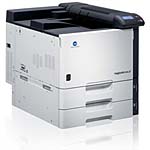

Product Details
Specifications
Accessories
Reviews
Product Details
Print and finish with speed and power using the best color laser printers in their class Konica Minolta magicolor 8650 printers. They feature an advanced design and enhanced security to handle the growing demands of today's networked workflow.
Overview
The Konica Minolta Magicolor 8650-HDN Color Laser Printer is a high speed, powerful, versatile document center. It offers 35 ppm output, built-in print control, modular finishing options, and simple plug-and-play installation making it the perfect color laser printers for home or office use.
-
Sleek design, with cables kept out of sight to preserve 360° styling that looks terrific and gives everyone quick access to print productivity.
-
35 ppm output speed in both color and B&W, to keep pace with high-volume document traffic and print high-impact color or cost-effective B&W on demand.
Other Features Include:
-
Simitri® HD Color Polymerized Toner for superb print quality, with razor-sharp text, high-resolution image detail and smooth halftones.
-
Built-in Emperon™ Print System for print control right out of the box, with PCL6 and PS3 emulations as well as a native XPS driver.
-
Powerful finishing options, including modular built-in finisher and floor finisher with capabilities including sort, group, staple, hole-punch, booklet-making and half-folding make them the best color laser printers for advanced document types.
Main Features:
-
Color and B&W Laser
-
Color: 35 ppm
-
B&W: 35 ppm
-
19200 x 600 dpi
-
1024MB RAM
-
Gigabit/Ethernet/USB 2.0
-
Up to 12.25" x 47.24"
-
USB 1.1 Host Port
-
Compatible with Windows, Mac and Linux
-
150 Sheet MPT
-
2 x 500 Sheet Cassette
-
Maximum Duty Cycle 150,000 a month
-
HD-508 60GB HDD
Specifications
Accessories

Reviews


Be sure that you are printing on the 'right' side of the paper - that is - the coated side.
Set your printer for the proper paper type and weight. Fine art papers are heavier than ordinary inkjet or bond papers so set the printer to thicker paper settings.
Don't be in a rush with your printer as you can easily damage a printer, or even get hurt, if you do not follow the instructions in the user manual.
MY ACCOUNT
INFO & POLICIES
SHOP EASY
PAYMENT OPTIONS



