



 Shopping Cart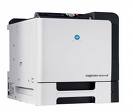

Product Details
Specifications
Accessories
Reviews
Product Details
With the Konica Minolta Magicolor 5650 Color Laser Printer color printing will never be the same again. Designed to print up to 31 ppm in vibrant color or B&W, KM5650 Color Laser Printer provides outstanding performance and convenient features.
Overview
A powerhouse laser printer for businesses both large and small, the magicolor 5650 delivers pages at speeds up to 31 ppm, with a first page out in 14 seconds for exceptional color printing output. Behind the scenes a 733 MHz processor and Gigabit Ethernet interface channel jobs for non-stop productivity.
-
High-speed color printing at 31 ppm in color and B&W keeps pages and people moving
-
Versatile connectivity with Gigabit Ethernet, USB 2.0 and parallel ports, and cross-platform compatibility for seamless interfacing with Windows, Macintosh and Linux systems.
Other Features Include:
-
Next-generation Emperon® Print System with PS3 and PCL 6 languages, plus native XPS support for Windows Vista systems.
-
Broad media support up to 8-1/2" x 47"; 600-sheet input expandable to 1,600 sheets; automatic duplexer and 2-bin staple finisher options.
-
Simitri HD Color Polymerized Toner and 9600 x 600 dpi-class quality produce striking, crisp prints; automatic density control keeps color consistent page after page.
-
Camera direct photo printing on up to 8-1/2" x 11" media; direct color printing of popular file types from USB flash drives with optional hard drive or compact flash card installed.
Main Features:
-
Color: 31 ppm
-
B&W: 31 ppm
-
9600 x 600 dpi
-
256MB RAM
-
Gigabit/Ethernet/USB and Parallel
-
Up to 8.5"x48"
-
Compatible with Windows, Mac and Linux
-
100 sheet mpt
-
500 sheet input
Specifications
Accessories

Reviews




If your print settings are too dark, it could be detrimental to the life of the cartridge in the long run. It’s important that the density control of the machine be properly set to prevent the machine from pulling too much toner into itself.
Handle inkjet papers like photographic papers - hold them by the edges to avoid oil deposits and fingerprints.
Set your printer for the proper paper type and weight. Fine art papers are heavier than ordinary inkjet or bond papers so set the printer to thicker paper settings.
MY ACCOUNT
INFO & POLICIES
SHOP EASY
PAYMENT OPTIONS



