



 Shopping Cart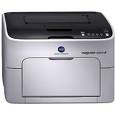

Product Details
Specifications
Accessories
Reviews
Product Details
Print high quality color and B&W documents affordably with the Konica Minolta magicolor 1600W. This ultra compact, lightweight printer fits into any environment making it the best home office printer for the money. The laser printer outputs up to 35,000 prints monthly on a variety of paper sizes at speeds up to 20 ppm B&W and 5 ppm color.
Overview
The magicolor 1600W is designed to be the best home office printer for your needs. Its extra small footprint of 15.6" x 15" makes it perfect for desktop use. Connect the printer to your computer easily with a built in Hi-Speed USB 2.0 interface for out of the box functionality. Plus it's affordable to own, with a low purchase price and cost per print. The Konica Minolta magicolor 1600W uses Simitri HD Polymerized Toner to create brilliant color and B&W images and text while saving energy due to its low operating temperature. With all those great features it's easy to see why the magicolor 1600W is the best home office printer available.
-
Space saving design that features paper input and output trays that can be closed when the printer is not in use.
-
Produces high-quality laser B&W and color prints at 1200 x 600 dpi using Simitri HD polymerized toner on a variety of paper sizes and media
-
Compatible with a variety of operating systems including Windows Vista, Windows XP, Windows Server 2003 and Windows 2000
-
Fast 20 pages per minute print B&W and 5 ppm color to keep your business moving
-
Quiet printer operation with acoustic noise levels of less than 50 dB(A)
Main Features:
-
Color: 5 ppm
-
B&W: 20 ppm
-
1200 x 600 dpi
-
16MB RAM
-
USB
-
Up to 8.5"x14"
-
Compatible with Windows
-
200 sheet input
Specifications
Accessories
*** ALL TONERS AND SUPPLIES ARE IN STOCK AT DISCOUNTED PRICING , CALL +18882983095
Reviews


Preview and proofread your documents on the screen before sending them to print. This will save you a lot of paper and re-printing.
Fed up of re-sorting your printouts? For those inkjets that don't have a reverse print feature in the driver, some programs offer printing in reverse order.
Looking to save paper and ink? Make sure to only print the pages you need of your document.
MY ACCOUNT
INFO & POLICIES
SHOP EASY
PAYMENT OPTIONS



