



 Shopping Cart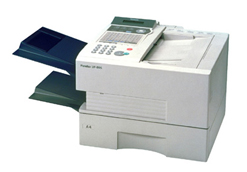

*** ALL TONERS AND SUPPLIES ARE IN STOCK AT DISCOUNTED PRICING , CALL +18882983095..
Printers do not include supplies - toners , drums (Imaging Units) (where applicable) , printer cables , manuals , consumables , trays (where applicable). Power cables are included. Drivers can be downloaded at www.hp.com. Please verify that drivers available are compatible with your software on HP’s site.
Product Details
Specifications
Accessories
Reviews
Product Details
Overview
Panasonic UF-885 Fax Machine 33.6 kbps modem 3-second transmission 2.7 second quickscan tri-access 50 pg. ADF 60 pg. expandable memory 200 autodialers 24 department codes PC / LAN compatible 10 ppm printing @ 600x600 dpi expandable 500 sheet paper tray (Not Included in Price)
Speed is only one of the ways in which the UF-885 boosts office productivity. Thanks to its high-capacity memory, this versatile machine can perform multiple jobs at the same time. For instance,while transmitting a fax from memory, it could also be printing out a document from a PC while you reserve the next transmission. Or it could be receiving a fax, printing a fax from memory, and getting ready to send a fax.
| Specifications | |
| Print Technology | Laser |
| Paper Type | Plain Paper |
| Fax Transmission Speed | 3 sec/page |
| Print Technology | Laser |
| Number of Copies | Up to 99 |
| Tray Capacity | 500 Sheets |
| Auto Doc Feeder | Yes |
| Max Copy Resolution | 406 x 391 dpi |
| Paper Size | A4, Letter, Legal |
| Memory, RAM | 1 MB RAM |
| Page Memory | 60 pages |
| Fax Forwarding | Yes |
| Broadcasting | 232 locations |
| Fax Speed | 33600 bps |
| Delayed Fax Send | Yes |
| Interface | ECM |
| Energy Star Compliant | Yes |
| Speed Dialing | Yes |
| Handset | Without Handset |
| Speakerphone | On Hook Dialing |
| Depth | 17.7 in. |
| Height | 12.2 in. |
| Width | 17.3 in. |
| Weight | 35 lb. |
Specifications
Accessories
*** ALL TONERS AND SUPPLIES ARE IN STOCK AT DISCOUNTED PRICING , CALL +18882983095
Reviews


If the fax machine has a display screen, look for a confirmation that the fax actually went through. Otherwise, your fax may print a confirmation.
The phone jack you use for a fax can either be your regular phone line or a dedicated fax line.
When loading paper into the fax machines’ paper tray, separate the individual pages by fanning them in order to avoid paper jams in the machine.
MY ACCOUNT
INFO & POLICIES
SHOP EASY
PAYMENT OPTIONS



