



 Shopping Cart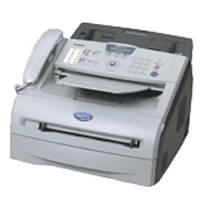

*** ALL TONERS AND SUPPLIES ARE IN STOCK AT DISCOUNTED PRICING , CALL +18882983095..
Printers do not include supplies - toners , drums (Imaging Units) (where applicable) , printer cables , manuals , consumables , trays (where applicable). Power cables are included. Drivers can be downloaded at www.hp.com. Please verify that drivers available are compatible with your software on HP’s site.
Product Details
Specifications
Accessories
Reviews
Product Details
Overview
The MFC-7220 is ideal for your home or home office business needs due to its compact size and full functionality. It doesn't sacrifice anything since it offers high-quality laser printing, copying, scanning, faxing and PC Fax.
Main Features
-
Fast printing and copying. Offers print and copy speeds of up to 20 pages per minute.
-
Large paper capacity. Features a 250-sheet paper tray adjustable for letter or legal size paper. Plus, a single-sheet manual bypass for envelopes, labels or other types of media.
-
High-quality laser output. Produces professional-looking documents at a low cost per page that laser technology provides you.
-
-
16 MB standard memory. Stores up to 500 pages in memory for faxing and can handle multiple print jobs and copying.
-
USB and parallel interfaces. Provides the flexibility of connecting to your computer via USB or Parallel or even to two computers.
-
PC-free copying and faxing. You don't have to be connected to a computer or have your computer turned ON to make copies or send and receive faxes.
| Specifications | |
| Print Technology | B/W Laser Technology |
| Consumable Type | Toner Cartridge & Drum Unit |
| Max. Black Print Speed (ppm) | 20ppm Black |
| Print Resolution (maximum dpi) | Up to 1200 x 600 dpi |
| Standard Input Paper Capacity (sheets) | 250-Sheet Input Capacity |
| Optional Paper Capacity (sheets) | No |
| Standard Interface(s) | Parallel & Full Speed USB 2.0 Interfaces |
| Optional Interface(s) | No |
| Standard Memory (MB) | 16MB Memory |
| Optional Memory (MB) | No |
| Printer Driver Compatibility | Windows® & Mac OS® |
| Emulation(s) | No |
| Maximum Monthly Duty Cycle | approx. 10,000 printed pages |
| Faxing Capability | B/W Faxing |
| Fax Modem Speed | 14.4K bps Fax Modem |
| Best Transmission Speed (sec) | Approx. 6 seconds per page |
| Out-of-Paper Reception | Yes |
| Telephone Handset | Corded telephone handset |
| External TAD interface | Yes |
| Caller ID Ready | Yes |
| Call Waiting Caller ID Ready | No |
| Distinctive Ring Detection Ready | Yes |
| Total Auto Dial Locations | 210 locations |
| Broadcasting (# of locations) | Yes (260 locations) |
| Quick Scan (Memory Transmission) | Approx. 4 sec/page |
| Auto Fax Reduction (for fax receiving) | Yes |
| Fax Forwarding | Yes |
| Automatic Redial | Yes |
| Dual Access | Yes |
| Fax/Telephone Switch | Yes |
| Fax Gray Scale | Mono: 64 |
| Fax Coding Method | Mono: MH/MR/MMR |
| PC Fax Capability (send/receive) | Yes |
| Fax Page Memory | Up to 500 page fax memory |
| Fax Page Memory (Brother Test Chart #1) | Up to 500 page fax memory |
| Copying Capability | B/W Copying |
| Design Style | Traditional Sheetfed |
| Max. Black Copy Speed (cpm) | 20cpm Black |
| Stand-alone Copying | No PC Required |
| Reduction/Enlargement | 50% - 200% |
| Sorting Function | Yes |
| N in 1 Function | 2in1 / 4in1 |
| Poster Function | No |
| Scanning Capability | B/W Scanning |
| Max. Interpolated Scan Resolution (dpi) | Up to 1200 dpi |
| Optical Scan Resolution (dpi) | 200 x 400 dpi |
| Scanner Driver Compatibility | Windows®/Mac OS® |
| Document Viewer Software | Includes Scansoft PaperPort® SE with OCR for Windows® and Presto!® PageManager® for Mac® |
| OCR Software | Includes Scansoft PaperPort® SE with OCR for Windows® and Presto!® PageManager® for Mac® |
| Formats (Export) | TIFF/BMP/MAX/JPG/PDF |
| "Scan To" feature | Email, Image, OCR, File |
Specifications
Accessories

Reviews


Don't be in a rush with your printer as you can easily damage a printer, or even get hurt, if you do not follow the instructions in the user manual.
Most printers have a built-in diagnostics program which can be very useful for troubleshooting problems and test-printing without a computer. They are usually initiated by pressing a button or two while turning on the printer.
Is your printer smearing immediately after changing a cartridge? Check that the protective tape over the nozzles is completely removed.
MY ACCOUNT
INFO & POLICIES
SHOP EASY
PAYMENT OPTIONS



